Monthly Archives: December 2010

First SQLSaturday in Wheeling, West Virginia was a Success!

After SQL Saturday #36 on May 1st 2010 my wife and I headed to Spain.  Somehow this post got lost in the shuffle when I got back. I thought it is important to share my thoughts of the event so here it is.

The first SQLSaturday in West Virginia can be summed up in two sentences.  The SQL Server Community is bleeping awesome.  The Ohio Valley is bleeping awesome. I know unfortunately I will leave some people out but I would like to thank the following individuals for their advice and support Andy Warren, John Parkinson, Thomas LaRock, Jeremiah Peschka, Justin Siebert, Joelle Ennis, and The Greater Wheeling Chapter of AITP.


Its now a little past a month six months after the first SQLSaturday in West Virginia and I am glad to share my thoughts on the event.  First, I would like to say we held it down for the DBA’s in the small cities who have dreams of hosing a SQLSaturday.  Don’t quote me on this but I believe we are the only SQLSaturday host city with a population under 50,000.

When we first started this mission in November 2009 our goal was to have 50 to 100 people register.  We actually had registration at 100 and had 70 people attend.  We had three tracks that delivered 16 13 sessions presented by 11 9 speakers.

Things that worked

  • Using WVNCC as venue – The West Virginia Northern Community College campus in Downtown Wheeling allowed us to use their facility.  We had the ballroom which held 100 people, two class rooms held 50+ and two smaller class rooms that held 30 attendees. This was a great fit and we are very grateful that they hosted the meeting for us.
  • Volunteers – We had a super all-star team of volunteers on hand for the SQL Saturday. Did I mention that the volunteers were awesome? There were, and they all did a great job.
  • Selected Speakers – All of the speakers did a great job.  The evaluations showed that everyone appreciated the presentations. We need a better way to deliver results to speakers. We will work on that for next year.
  • Lunch – The box lunches from Panera Bread were a hit.  The food arrived as scheduled.  One of our volunteers was also arranged to have the Catholic Charities pick up the leftover food.  Once again, did I mention that our volunteers rock?

Things that need improved

  • Get more people involved – While we had plenty of support for the big day only two people did the majority of the pre-day work. Hopefully, we can get more people involved earlier next year.
  • Build Higher Goals –  Our venue can support more people. We tried our best to keep it simple because we didn’t know what we were doing as this was the first major information technology event in Wheeling, WV for years. Now we know what we are doing so we should try to go buck wild next year.
  • Evaluations – I will take the blame here and say that we failed.  We didn’t have a good system for generating feedback.
  • More Speakers – We cut it close with filling up our three tracks. Next year I we will need to be more active with pulling speakers.  If you are interested in speaking next year contact me and I will get you on our contact list.

Thanks to the speakers

We would like to give a shout out to all the speakers for making SQLSaturday in Wheeling happen.  You were all awesome.  Check out their blogs and tweets.

Thanks to the sponsors

Whats Next?

  • 2nd Annual SQL Saturday in West Virginia – This is correct, we are excited to give it another run and are targeting June 2011. We will shoot out an update to let everyone know when we have an official date.
  • Wheeling SQL Server User Group – Hey John there is no SQL Server User Group in West Virginia what are you smoking?  First, I don’t smoke and second there will be. Our first meeting will be on January 20th. Check out my blog during the first week of January for more information.

Related Posts:

Policy-Based Management Myths Series Finale

Welcome to the Policy-Based Management myths finale.  Do to some great questions at SQL Saturday # 61 in DC I am going to focus on some myths that come up with Policy-based Management.  Today is the final installment, you can catch the other myths below.

You cannot use Policy-Based Management with SQL Server 2008 R2 Express

Just like the two other myths the answer is true and false.  This one, really through me for a loop mainly because I don’t normally use SQL Express. With that said, if you want to store or use SSMS to create a policy while connected to SQL Express instance the answer is false.  If you want to evaluate an existing SQL Express instance the answer is true.

Why can’t I create policies or store them in SQL Express 2008 R2?

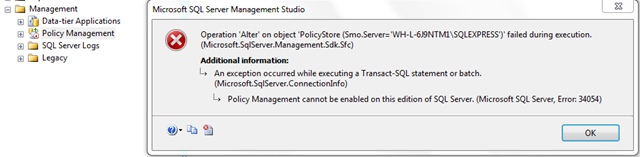
When I read the following article on SQL Server 2008 R2 Express site I would think that the flexible section make it seam like you could store and create policies with that edition of SQL Server.  Unfortunately, you will notice that Policy-Based Management is disabled. This isn’t too bad, lets just enable it.  Oh snap……….  You get the friendly error message that states, “Policy-Based Management cannot be enabled on this edition of SQL Server.”

image

How do I evaluate policies against SQL Express 2008 R2?

So, I cannot enable Policy-Based Management on SQL Server 2008 R2 Express edition can I still evaluate and apply changes to this instance of SQL Server? Yes, you can, once you have your policies built you can use Central Management Server to evaluate and apply changes.

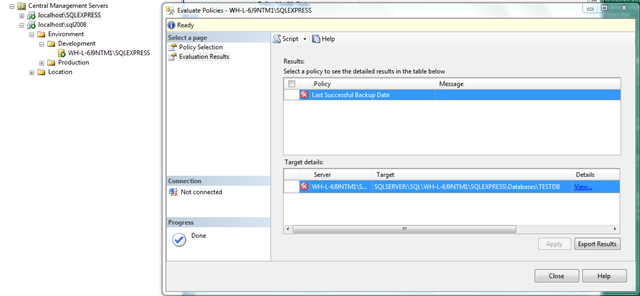
Below is a screen shot of me evaluating the built-in “Last Successful Backup” policy against an instance of SQL Server 2008 R2 Express.  You will see that it fails because well I don’t use Express so I don’t have the databases backed up.

image

Note: There will be more to come in a future blog post on setting up Central management Server and using it to execute Policy-Based Management policies.

How can I build a policy to work against SQL Express 2008 R2?

Connect to another instance of SQL Server using, Standard,  Enterprise, or Developer to generate your policies via SSMS and store the policy on a central instance of SQL Server (not express) or on a file share.

Related Posts:

Policy-Based Management Myths (2 of 3)

A few weekends ago I gave an “Introduction to Policy-Based Management and Central Management System” at SQL Saturday 61 in DC. Do to some great questions I am going to focus on some myths that come up with Policy-based Management this week.  Check back through the week to catch all three myths.  Today we will cover the second myth.

By default a policy using the database facets will run against all databases

The myth is true and false.  Actually, using the default database target condition (every database) the myth is true. If you build your own condition for the target then the myth can be false.

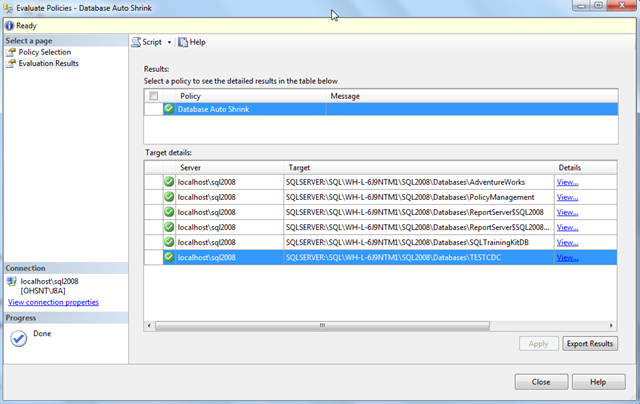
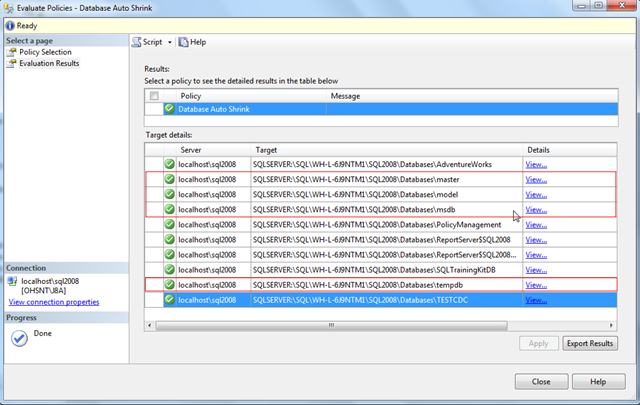
Lets take another look at the “Auto Shrink Database” policy that comes out of the box with SQL Server 2008. When you evaluate the policy you will see that the system databases (msdb, master, model, tempdb) are not included.

image

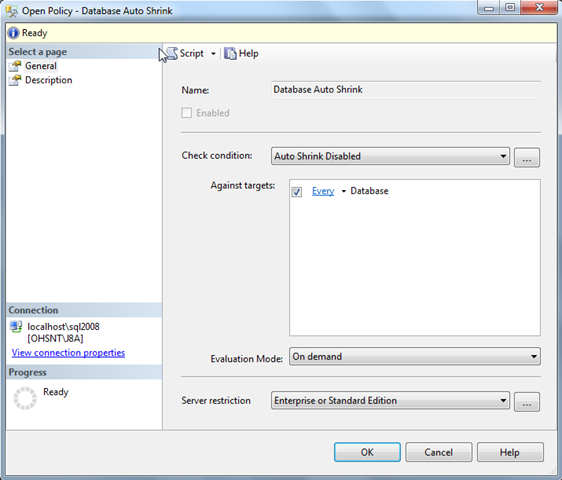
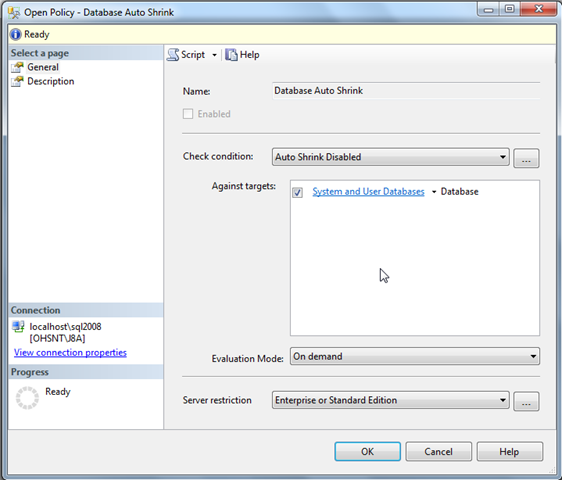
My first thought is to checkout the target properties.  Maybe for some reason the system databases are exempt.  Looking at the target below you will see that every database is suppose to be included.  Obviously, this means all databases are included, right? No, sorry system databases are not included.

image

How do I evaluate policies against all databases?

Lets create a new condition that we will use as our target condition.  In a nutshell we need a condition that shows all databases when they are system objects or are not system objects.  If you select the database facet you will notice there is an IsSystemObject field.  This is our ticket getting all databases.

image

Lets now change the target condition to use the condition created above. We will no longer have every databases as our target condition and select our new System and User Databases target condition.

image

Now lets evaluate the policy again.  You will now see all user databases and system databases as I expected when you used the default target condition.

image

Come back on Monday to find our last installment of the Policy-Based Management myths.

Related Posts:

Policy-Based Management Myths (1 of 3)

A few weekends ago I gave an “Introduction to Policy-Based Management and Central Management System” at SQL Saturday 61 in DC. Do to some great questions I am going to focus on some myths that come up with Policy-based Management this week.  Check back through the week to catch all three myths.  Today we will cover the first of the following three myths.

You cannot execute and apply policies against an instance of SQL Server 2000.

The answer is yes and no.  You can execute and apply policies against an instance of SQL Server 2000 if the policy executed runs against features supported in SQL Server 2000. This is easy to do if you have a central management server setup.  I will walk you through the steps below assuming a CMS exists.

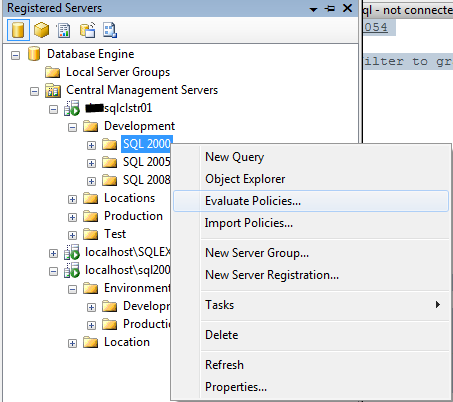
1. Right click on the node in your Configuration Management System that hosts your instances of SQL Server 2000 and right click and select evaluate policies as shown below.

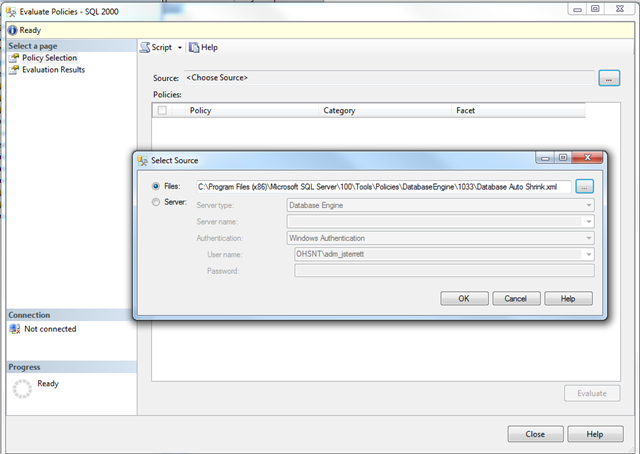
image2. Click on the ellipse next the source and select the policy files you would like to execute or select a sever where the policies reside.  In this example we will execute the Database Auto Shrink built-in best practice policy.  By default they are located at C:\Program Files (x86)\Microsoft SQL Server\100\Tools\Policies\DatabaseEngine\1033\. Once you have loaded the Database Auto Shrink policy click execute and the policy will be evaluated against every server in your CMS group.

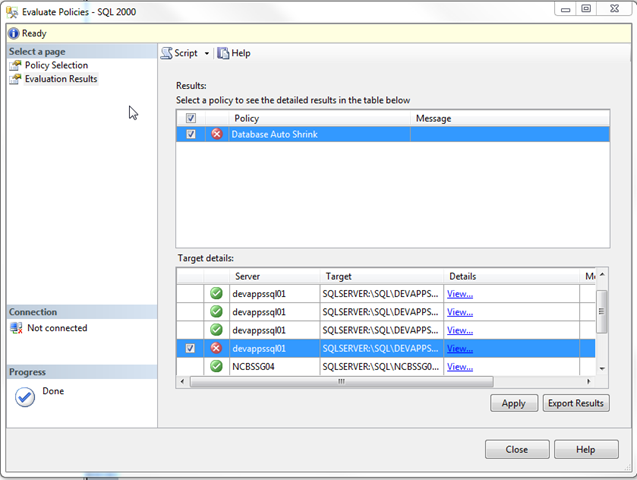
image3.   The following are the results of executing the “Database Auto Shrink” policy against a group of development SQL Server 2000 instances.  You will noticed that the policy failed as there are databases that have auto shrink equals true. We can click on the checkboxes and apply the policy to force the databases to be compliant with our policy.

image

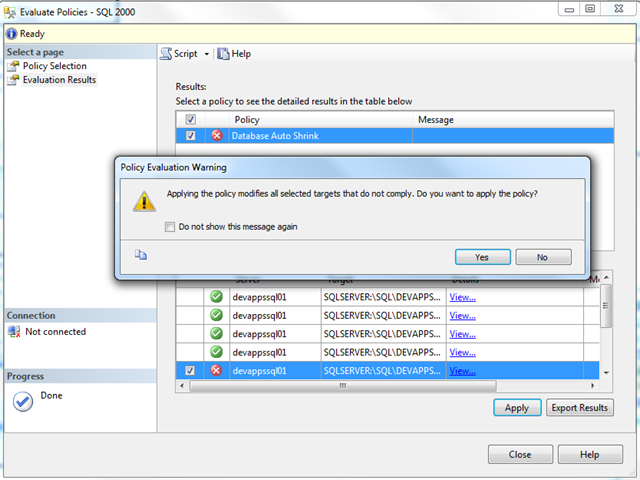
4. Click yes on the next popup screen will apply the policy to modify all selected targets that do not comply.  Make sure you want to do this before you apply the policy.

image

5. After selecting apply you should see that you were able to apply the changes to make your SQL Server 2000 databases are compliant with the policy.

Can you show me an example of a policy that will not work on SQL Server 2000?

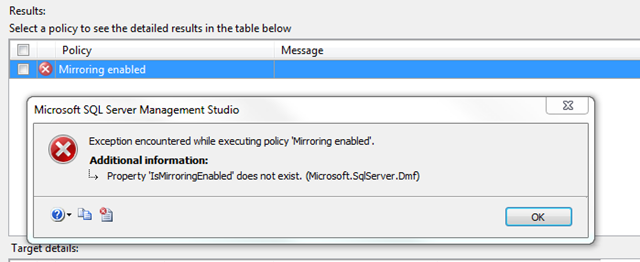
Database Mirroring is not supported in SQL Server 2000 as it was delivered in SQL Server 2005 SP1.  If you have a policy that checks to see if mirroring is enabled and you run it against a SQL Server 2000 instance the policy will fail.  In fact, you will receive an “Property ‘IsMirroringEnabled’ does not exist error.

image

Check back during the week to catch the next Policy-Based Management myth.

You don’t have to be an expert to speak

Brent Ozar recently posted a great blog post for people who are setting goals to speak in 2011.  His post motivated me to do one for people who are interested in speaking but don’t because they think you must be an expert.  I have a secret for you, I use to be one of those people. If you learn anything from me please check out the next sentence.  You don’t have to be an expert to speak in the SQL Server community.

I am not an expert but I stayed at a Holiday Inn Express last night...

I am not an expert but I stayed at a Holiday Inn Express last night...

I have proof that you don’t have to be an expert to speak.  I did a lightning talk at the world’s largest and best conference for SQL Server professionals and while I strive to be an expert I have a long way to go!

In my opinion speaking is just like playing any sport.  You cannot get better if you don’t get out there and practice, practice, practice. If you don’t practice speaking how can you become an expert speaker? The SQL Server Community is awesome and they have your back. There are several avenues for people to start speaking.  Experts are also willing to give you pointers along your way to help you get better.

What should I talk about?

This one is easy, talk about what you know. A list of tips or best practices you have discovered through your quest of SQL Server greatness would be a great start.   Recently, I have spent quite a bit of time figuring out how I could monitor and apply best practices to my SQL Server farm.  I compiled my notes and a presentation was born.

A well known speaker already submitted my topic

Submit your topic anyway.  Speakers usually submit multiple topics expecting to only do a couple presentations. If you submit your abstract it might get accepted so the other speaker can do another presentation.  Andy Warren (blog | @sqlandy) just wrote a blog post about missing an opportunity to speak. Andy thinks that  too many speakers is a good thing.

Where should I speak?

There are several options for you to  speak do your thing:

If you have never submitted a session to a User Group, SQL Saturday, Virtual chapter do it.  Trust me, if I can give a presentation anyone can.

Monitor your SQL Server farm with Policy-Based Management and Central Management Server

This past weekend I had a blast at SQL Saturday #61 in Reston, VA.  I gave a brand new topic on “Monitoring your SQL Server farm with Policy-Based Management and Central Management Server.” I showed everyone how I run my daily checklist. In fact, its usually done in the amount of time it takes me get a cup of coffee.

Slides and code

My slide deck, Intro to PBM and CMS is available for you to download.  The zip file also includes two scripts I run against our Central Management Server while I get coffee.

Links

You can also find several links that I used to learn Policy-Based Management and Central Management Server here