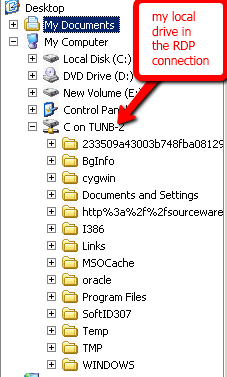
Have you ever wished there was a way to share your local drive with an Remote Desktop Connection? I have, especially when a client doesn’t have a test box. For example, lets say I need to do a perfmon trace for performance tuning. I would usually use the PAL Tool to generate a perfmon template and copy it from my machine to the server to configure the trace. Once the perfmon collection is finished I would want to copy the template back down to my individual machine to generate the PAL reports.
This lead me to do some research and I found an easy solution that works. Hopefully, this tip helps you out in the future.
Time For The Good Stuff…
Load your Remote Desktop Connection tool and enter in your computer name for the server. For this example I am going to keep the computer name and user name blank. Now click on the options button in the lower right corner of the RDC screen.
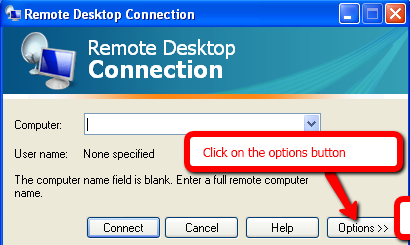
Type in your computer name and user name for your Remote Desktop Connection. Once your computer name and user name are entered click on the local resources tab.
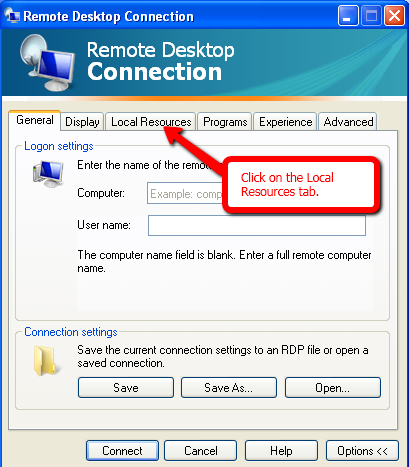
Now that we are on the local resources tab click on the “More” button shown at the bottom left corner of the screen.
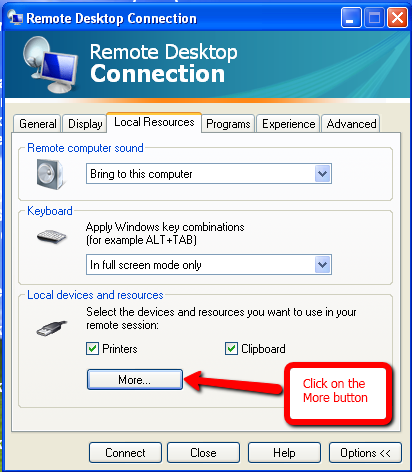
Select the local drives you would like to share with your Remote Desktop Connection. In this example I am only going to share my C drive.
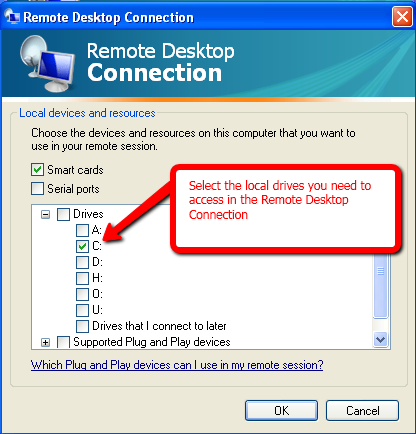
The following screen shot will show you that I am sharing my local C drive on the Remote Desktop Connection.