Category Archives: SQL Server

All SQL Server posts that don’t fit in other categories

Meme Monday: I Got 9 SQL Backup Problems but a Disk Ain’t One…

First of all I had no idea Hugo did a version of “99 Problems.” I may be biased because I have two turntables and a microphone (If you volunteer to help or speak at  SQLSaturday #80 I can give you a demo) but its true Jay-Z’s version is much better than Hugo’s version.

I got two turntables and a microphone

I got two turntables and a microphone

Now that we have who’s version of “99 Problems…” is better resolved lets dive into this months Meme Monday. If you are not familiar with Meme Monday check out Tom LaRock’s (blog @SQLRockStar) blog post for more details.

Here are nine problems directly related to backups and monitoring backups that I have seen in my IT career that spans an ISV shop, consulting and the corporate world. I hope you don’t find these in your shop. Here they are in no particular order.

  1. No Automated process to backup your databases
  2. No retention policy or standards
  3. No Automated process to verify that backups succeeded
  4. Database Mail is not enabled (You cannot get any job failure emails with out DB mail)
  5. Notification for backup jobs don’t include an operator to alert SQL team on failure
  6. DBA doesn’t practice recovering databases from backups
  7. No automated  jobs to do transactional log backups on databases in “Full”  or “Bulk-Logged” Recovery mode
  8. Backups do not exist outside the production server
  9. Backup drive ran out of space (Oh snap, I broke rule #1 I cannot talk about disks)
Pittsburgh SQL User Group is Back!

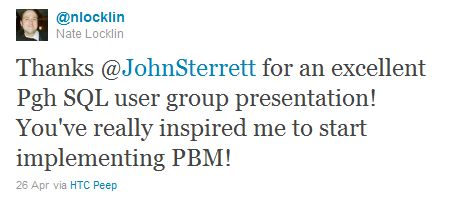
It was an honor to be the first presenter for the reboot of the Pittsburgh SQL Server User Group on Tuesday.  I gave a sneak peek into my SQL Rally presentation, “Evaluate your daily checklist against 100+ servers while you get a cup of coffee.” I knew it was a success when I got home and saw the following tweet.

This tweet is purely SQLWinning

This tweet is purely SQLWinning

If you attended the session feel free to download the slide deck and check out my reference material.

Question and Answers

I get a kick out of helping people solve problems. If I don’t know the answer this gives me the opportunity to learn something new. Here are a few questions that were asked during my session. I didn’t have the answers of the top of my head so I am including them in this post.

Q: “How can I automate the process of shrinking a T-Log?”

A: First I highly recommend reviewing your backup and recovery plan. Frequent backups of the transactional log is key to free up your VLF’s. If there isn’t a free VLF available the log grows. With that said, if you just want to automate the process of shrinking T-Logs check out Jeremiha Peschka’s script

Q: “How do I run a T-SQL script against all databases on a single instance?”

A: First, I was thinking about doing a simple loop in PowerShell to execute the T-SQL (see Aaron Nelson’s second script) but then I remembered an undocumented stored procedure. The undocumented stored procedure is sp_msforeachdb. Both options should work.

Photos

Below is a few photos taken before I started the presentation.

Right side say, "cheese"

Right side say, "cheese"

Left side say, "gouda"

Left side say, "gouda"

Changing SQL Server Job Owners against the SQL Server Enterprise

Last night on twitter an interesting question was asked by @just_samson using the #SQLHelp hash tag. He asked, “can you change the owner for jobs &dbs across instances using Policy Based Management and Central Management Server?”  The answer to this question is no because an agent facet doesn’t exist. Users cannot create facets.  Does this mean he is dead out of the water? No, because good old T-SQL and CMS can be leveraged to get the job done.

Today we are going to focus on changing SQL Agent Job owners.

How do we find owners?


SELECT
    sv.name AS [Name],
    sv.job_id AS [JobID],
    l.name AS UserName
    FROM
    msdb.dbo.sysjobs_view AS sv
    INNER JOIN [master].[sys].[syslogins] l ON sv.owner_sid = l.sid
    ORDER BY
    sv.[Name] ASC

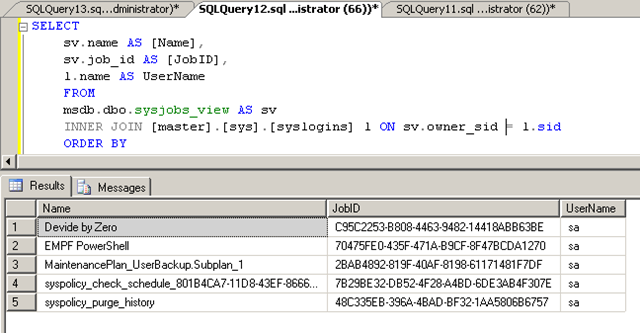
Here is a screen shot from my demo so you can follow along.

image

How do we change the job owner for all jobs?

You can see that the first job “Device by Zero” has the owner name set to “PBMDEMO\Administrator.” In this example we will want to change the owner to be “sa”. The following script below will do this. The only problem is you would have to run this script against every instance. That’s where the Central Management Server comes into play.

** This script is used as demo. It will only work against SQL 2005\2008\2008R2. Run it on development before you consider using it in production. If you decide to run it in production you are on your own. Run it at your own risk. **


DECLARE @JobID uniqueidentifier
DECLARE @NewOwner varchar(200)
DECLARE @OldName varchar(200)

SET @NewOwner = 'sa'
SET @OldName = 'PBMDEMO\Administrator'

SELECT
sv.name AS [Name],
sv.job_id AS [JobID],
l.name AS [OwnerName]
INTO #SQLJobs
FROM
msdb.dbo.sysjobs_view AS sv
INNER JOIN [master].[sys].[syslogins] l ON sv.owner_sid = l.sid
WHERE l.name like @OldName
ORDER BY
sv.[Name] ASC

SELECT * FROM #SQLJobs
WHILE (SELECT COUNT(*) FROM #SQLJobs ) > 0 BEGIN
    SELECT TOP 1 @JobID = JobID FROM #SQLJobs
    EXEC msdb.dbo.sp_update_job @job_id= @JobID,
        @owner_login_name=@NewOwner
        DELETE FROM #SQLJobs WHERE JobID = @JobID

END

DROP TABLE #SQLJobs

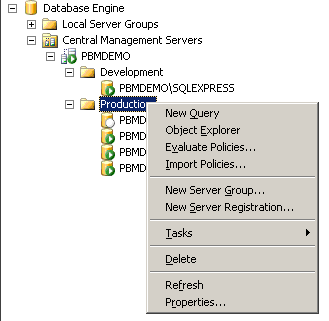
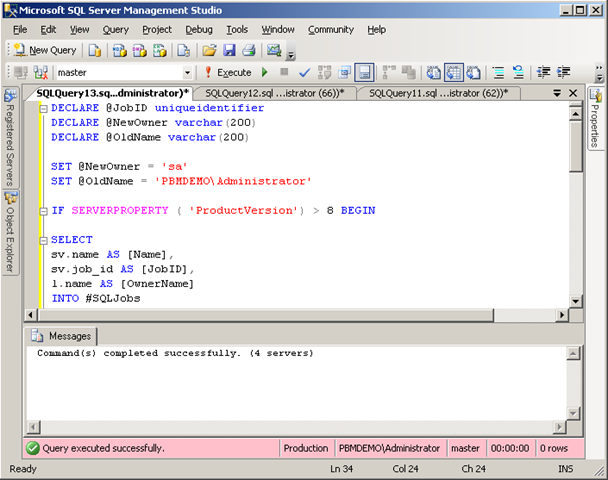
Now assuming you have Central Management Server configured just right click on the group of servers you want the change to be applied to and select “New Query.” Copy and paste the code and you should be able to execute the query.  Below are some screenshots from my demo incase you are new to Central Management Server. We will apply the script against the Production group.

image

image

Finally if we execute the initial query we will see that all jobs have “sa” as the owner.

image

Other Related Articles:

Being proactive with Central Management Server