Category Archives: SQL Server

All SQL Server posts that don’t fit in other categories

Speaking at WV SQL User Group on August 25th

I look forward to giving my Evaluate your Daily Checklist against your SQL Enterprise with PBM and CMS presentation at the WV SQL Server User Group in Wheeling, WV on August 25th at the Orrick Building.
You can still sign up and registration is free.  In fact, everyone is a winner because there will be free pizza and every user group attendees knows there is no better prize than free pizza!

Abstract

You will walk away from this session with an understanding of how to use the Policy Based Management and Central Management Server to complete a daily checklist against your whole SQL Server farm. We will cover the basics to evaluate, monitor and apply best practice policies, which are included out of the box with SQL Server 2008. We will also make custom policies to cover additional best practices to evaluate daily checklist items. Finally, we will combine Policy-Based Management and Central Management Server with the Enterprise Policy Management Framework on codeplex to automate the monitoring process and create manager friendly reports to monitor your checklist items against the whole SQL Server farm.

Session goals include:
  • You will be able to install, configure and run scripts against the Central Management Server
  • You will be able to use Central Management Server and/or Policy-Based Management to complete a daily checklist
  • You will be able to evaluate and build custom policies.

Bio:
John Sterrett is a database administrator at Remote DBA Experts and a member of the Integrations team. John has been active within the SQL Server community, including hosting the first and second annual SQL Saturday in West Virginia. John also presented a lightning talk and chalk-talk at the SQL Server 2010 Member Summit, presented sessions at three SQL Saturday’s, and presented to the Pittsburgh SQL Server User Group. John is a syndicated blogger at SQLServerPedia and contributes tips at MSSQLTIPS. You can find his blog at www.johnsterrett.com

Photo Gallery – SQL Saturday #80 in Wheeling, WV

Below is a collection of photos at SQL Saturday #80 in Wheeling, WV on July 23rd.

You can find my recap of hosting SQL Saturday #80 here.

SQL Saturday #80 was a Success!

On Saturday July 23rd the WVPASS and Greater Wheeling Chapter of AITP joined forces to host the 2nd Annual SQL Saturday in Wheeling, WV. SQLSaturday is a one-day free training event for SQL Server professionals and those wanting to learn about SQL Server brought to you by the local SQL Server community and PASS (Professional Association for SQL Server).

The following is a quick run down of our stats for the event. We had 108 people signup, 85 attendees, 11 speakers covering 18 sessions on Saturday.   Many thanks goes out to the speakers, volunteers, sponsors and attendees for making this a successful SQL Saturday.

The Good

  • We had a great mix of MVP’s, experienced speakers and first time speakers. One of the greatest accomplishments for this event is giving Matt Velic (Check out his #sqlsat80 photo’s), Abi Chapagai and Shannon Lowder their first opportunity to speak at a SQL Saturday. The speakers all did a fantastic job. We received several comments from attendees thanking us for having fantastic speakers.
  • Registration was quick and smooth. Everyone was able to get in and get to the main room to socialize and enjoy a free breakfast. The volunteers did a fantastic job.
  • We took a step outside of the box with lunch and got burrito’s from Salsa Café. With only a few complaints this was a hit. Last year we did box lunches from Panera and it was expensive and we also got lukewarm reviews.
  • Speakers received their evaluation’s shortly after their sessions. Personally, I have spoken at a few events and never received my feedback so I completely understand how important it can be towards growing as a speaker.
  • WVNCC was a fantastic host facility. The staff was very friendly and able to get us everything we needed to be successful.
  • Hosted the event on a $2,400.00 budget. There will be more on this in a future blog post.

Stuff to work on Next year!

  • Speakers dinner might have been a little too early. We held our dinner at 6pm and a few speakers wanted to attend but couldn’t make it in time. We also had plans of following our dinner with a voyage of the Italian Festival but a rain storm quickly sidelined that plan.
  • SQLGolf was a great idea and fun until the heat kicked our butt around the fifth hole. Once we got to the eighteenth hole I forgot we were still playing golf.
  • We need more onsite sponsors next year.
  • Bacon was not included in breakfast.

Best Birthday Ever!

Last week I celebrated my birthday and I have to admit it was the best birthday ever! The following are a few of the highlights including a nice suprise for everyone who follows my blog.

I got to spend my first birthday with baby beluga.  This alone is priceless and a moment that will not be forgotten.

My wife threw a great surprise dinner that included several friends. It was an unexpected suprise.  In fact, I had to cancel dinner plans with Allen White (blog | @SQLRunr) who came into Wheeling, W V just to see me!  Okay, he may tell you he came to race in the Ogden half marathon but we know he came to wish me a happy birthday.

Finally, I gave myself a great gift. The gift of a new oppertunity. That’s right friends I am one of the Remote DBA Experts. No, seriously I am a SQL Server DBA at Remote DBA Experts. I just started this week and I am stoked to be part of the team. If you have any SQL Server needs contact me (I can make a recommendation)

Top 10 Policy-Based Management Policies from MSSQLTIPS.com

Whenever I give a presentation about Policy-Based Management I always mention that www.mssqltips.com has a great library of policies to import. To this point I never provided a top ten list of recommended policies.  In no particular order are ten policies I highly recommend.

Shameless Plug: I need your vote for the Member Summit

I just got back from SQLRally and I would love to speak at the 2011 SQL Server PASS Member Summit (the greatest conference in the world for SQL Server Professionals) and I need your help. This year they are including your session preferences in the session selection process. If you are a fan or enjoyed my presentations at a user group, SQL Saturday or SQL Rally  please vote for my session “Evaluate a Daily Checklist against 100+ instances of SQL Server while you get a cup of coffee” (login required):

http://www.sqlpass.org/summit/2011/Speakers/SessionPreferencing.aspx?spid=104

Thanks in advance for your support! Voting closes on Friday, May 20th. Even if you’re not interested in my session help the committee select other speakers by marking their sessions as preferred.

Speaking at SQLRally today!

A few months ago I blogged that you don’t have to be an expert to speak. This fact is very true as I am speaking at #SQLRally  today about “Evaluating a daily checklist against 100+ instances of SQL Server while you get a cup of coffee.” Two years ago I would have never imagined that it would be possible for me to share my knowledge at SQLPASS events.

NOTE: If you are attending my session and have a camera please take photos and share them with me. I forgot my camera in Wheeling, West Virginia.

If you are at SQLRally or not at SQLRally you can access my slide deck here.  You can also find my references here. If you have any questions feel free to contact me.

Passed my #SQLUniversity PowerShell Midterm!

I am always up for learning something new so I jumped in on the free PowerShell training at SQL University. I saw that Aaron Nelson gave me the tools to loop through a Central Management Server and I was inspired. My main motivation came from learning that Policy-Based Management isn’t the ideal solution for evaluating a daily checklist. I started to notice that the time needed to evaluate full backups started to grow as more databases were added to the farm.
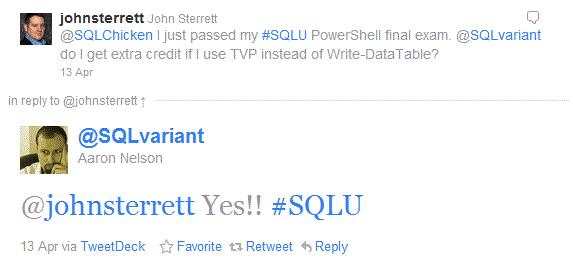
I passed the #SQLU exam and got extra credit!

With the following framework you can automate the process of collecting data from the system tables and DMV’s. In this example we are going to focus on automating the process of collecting failed full backups within the last 24 hours.

NOTE: Remember, you could apply this framework to automate the process of collecting any data from the system tables or DMV’s.

Below is the framework steps: (Steps 1 – 3 are need only for the first implementation)

  1. Configure your Central Management Server (We will assume you have this completed)
  2. Configure your server to run PowerShell with SQL. (Go to PowerShell week at SQLUniversity for the guide)
  3. Get and import the out-DataTable PowerShell function
  4. Create and save T-SQL query you want to run against your SQL farm.
  5. Create table to store results
  6. Create table type required with Table Value Parameters
  7. Create stored procedure to insert DataTable
  8. Automate with SQL Agent Job

PowerShell – Find failed backups in the last 24 hours.

In general the following block of PowerShell will allow you to collect results for any query executed against your SQL Farm with the Central Management Server. With that said, there are a few lines that will need to explain so it can be modified for the code to work in your shop.

  1. On line #1, the CMS for this example is PBMDEMO. You will need to switch this to your CMS server.
  2. On line #4, the T-SQL file is named “Missing Backups.sql” and its located at C:\Demos\CMS_PBM\Scripts\T-SQL. You will need to change this to T-SQL file you want to execute against your SQL farm.
  3. On line #7, the server name and database will need to be changed to your daily checklist repository. In this example I use PBMDEMO and PolicyManagement.
  4. On line #10, the stored procedure name will need to be the name for your stored procedure to input your collected date using Table Value Parameters.
  5. On line #17, The table type will need to match your table type used to strongly type the table parameter in your stored procedure (more on this below)

We will save the PowerShell script as FailedBackups.ps1 in the C:\demos\CMS_PBM\Scripts\PowerShell folder so the SQL Agent job will just load this file when we automate the data collection solution.


foreach ($RegisteredSQLs in dir -recurse SQLSERVER:\SQLRegistration\'Central Management Server Group'\PBMDEMO\ | where {$_.Mode -ne "d"} )
{

$dt = Invoke-sqlcmd -ServerInstance "$($RegisteredSQLs.ServerName)" -Database "tempdb" -InputFile "C:\Demos\CMS_PBM\Scripts\T-SQL\Missing backups.sql" | out-DataTable
$dt
# Write data table to database using TVP
$conn = new-Object System.Data.SqlClient.SqlConnection("Server=PBMDEMO;DataBase=PolicyManagement;Integrated Security=SSPI")
$conn.Open() | out-null
"Connected"
$cmd = new-Object System.Data.SqlClient.SqlCommand("dbo.usp_InsertFailedBackups", $conn)
$cmd.CommandType = [System.Data.CommandType]'StoredProcedure'
#SQLParameter
$spParam = new-Object System.Data.SqlClient.SqlParameter
$spParam.ParameterName = "@TVP"
$spParam.Value = $dt
$spParam.SqlDbType = "Structured" #SqlDbType.Structured
$spParam.TypeName = "FailedBackups"

$cmd.Parameters.Add($spParam) | out-Null
$cmd.ExecuteNonQuery() | out-Null
$conn.Close() | out-Null
}

T-SQL Query to find failed backups. You will need to save it as “Missing Backup.sql” and place it in the C:\Demos\CMS_PBM\Scripts\T-SQL folder or modify the second line of code in the PowerShell example above to have the correct name and path.

BEGIN

DECLARE @BackupDB TABLE (database_name varchar(255), last_db_backup_date datetime, database_id integer)
INSERT INTO @BackupDB (database_name, last_db_backup_date, database_id)
SELECT
msdb.dbo.backupset.database_name,
MAX(msdb.dbo.backupset.backup_finish_date) AS last_db_backup_date,
DB_ID(database_name)
FROM   msdb.dbo.backupmediafamily
INNER JOIN msdb.dbo.backupset ON msdb.dbo.backupmediafamily.media_set_id = msdb.dbo.backupset.media_set_id
WHERE  msdb.dbo.backupset.type = 'D'
GROUP BY
msdb.dbo.backupset.database_name
ORDER BY
msdb.dbo.backupset.database_name

SELECT SERVERPROPERTY('ServerName') AS ServerName, name AS DatabaseName, last_db_backup_date
FROM master.dbo.sysdatabases  d LEFT JOIN @BackupDB b ON (DB_ID(d.name) = b.database_id)
WHERE (last_db_backup_date < DATEADD(hh, -24, getdate())
OR b.last_db_backup_date IS NULL)
AND dbid > 4
END

Create Table

The following table will be used to save the results for running the above t-sql query against the SQL Server farm.

CREATE TABLE [dbo].[FailedBackups](
[ServerName] [varchar](250) NULL,
[DatabaseName] [varchar](max) NULL,
[DateCaptured] [datetime] NULL,
[last_db_backup_date] [datetime] NULL
) ON [PRIMARY]

GO

Create Table Type

The table type is used as a requirement of using Table Value Parameters. This allows the stored procedure to know what table you are trying to pass to the stored procedure. The last five columns are required by the out-DataTable powershell function.

CREATE TYPE [dbo].[FailedBackups] AS TABLE(
[ServerName] [varchar](250) NOT NULL,
[DatabaseName] [varchar](max) NOT NULL,
[last_db_backup_date] [datetime] NULL,
[RowError] [varchar](1000) NULL,
[RowState] [varchar](1000) NULL,
[Table] [varchar](1000) NULL,
[ItemArray] [varchar](1000) NULL,
[HasErrors] [varchar](1000) NULL
)
GO

Create Insert Stored Procedure

The following stored procedure leverages Table Value Parameters to input a DataTable and do a insert select statement to populate the table.

CREATE PROCEDURE [dbo].[usp_InsertFailedBackups] @TVP FailedBackups readonly
AS
BEGIN

INSERT INTO dbo.FailedBackups (ServerName,DatabaseName, DateCaptured, last_db_backup_date)
SELECT  ServerName,
DatabaseName,
GETDATE(),
last_db_backup_date
FROM    @TVP
END

Automate Data Collection with SQL Agent and PowerShell

If you have used the Central Management Server you will notice quickly that you cannot schedule a query to run agains your farm. An easy work around is to use PowerShell to run your t-sql via a SQL Agent Job. Below is an simple scripted example that does that.

USE [msdb]
GO

/****** Object:  Job [Daily Checklist - Failed Backups]    Script Date: 05/11/2011 23:43:52 ******/
BEGIN TRANSACTION
DECLARE @ReturnCode INT
SELECT @ReturnCode = 0
/****** Object:  JobCategory [[Uncategorized (Local)]]]    Script Date: 05/11/2011 23:43:52 ******/
IF NOT EXISTS (SELECT name FROM msdb.dbo.syscategories WHERE name=N'[Uncategorized (Local)]' AND category_class=1)
BEGIN
EXEC @ReturnCode = msdb.dbo.sp_add_category @class=N'JOB', @type=N'LOCAL', @name=N'[Uncategorized (Local)]'
IF (@@ERROR <> 0 OR @ReturnCode <> 0) GOTO QuitWithRollback

END

DECLARE @jobId BINARY(16)
EXEC @ReturnCode =  msdb.dbo.sp_add_job @job_name=N'Daily Checklist - Failed Backups',
@enabled=1,
@notify_level_eventlog=0,
@notify_level_email=0,
@notify_level_netsend=0,
@notify_level_page=0,
@delete_level=0,
@description=N'No description available.',
@category_name=N'[Uncategorized (Local)]',
@owner_login_name=N'sa', @job_id = @jobId OUTPUT
IF (@@ERROR <> 0 OR @ReturnCode <> 0) GOTO QuitWithRollback
/****** Object:  Step [PowerShell - Find Failed Backups]    Script Date: 05/11/2011 23:43:53 ******/
EXEC @ReturnCode = msdb.dbo.sp_add_jobstep @job_id=@jobId, @step_name=N'PowerShell - Find Failed Backups',
@step_id=1,
@cmdexec_success_code=0,
@on_success_action=1,
@on_success_step_id=0,
@on_fail_action=2,
@on_fail_step_id=0,
@retry_attempts=0,
@retry_interval=0,
@os_run_priority=0, @subsystem=N'PowerShell',
@command=N'. C:\Demos\CMS_PBM\Scripts\PowerShell\out-DataTable.ps1
. C:\Demos\CMS_PBM\Scripts\PowerShell\FailedBackups.ps1',
@database_name=N'master',
@flags=0
IF (@@ERROR <> 0 OR @ReturnCode <> 0) GOTO QuitWithRollback
EXEC @ReturnCode = msdb.dbo.sp_update_job @job_id = @jobId, @start_step_id = 1
IF (@@ERROR <> 0 OR @ReturnCode <> 0) GOTO QuitWithRollback
EXEC @ReturnCode = msdb.dbo.sp_add_jobserver @job_id = @jobId, @server_name = N'(local)'
IF (@@ERROR <> 0 OR @ReturnCode <> 0) GOTO QuitWithRollback
COMMIT TRANSACTION
GOTO EndSave
QuitWithRollback:
IF (@@TRANCOUNT > 0) ROLLBACK TRANSACTION
EndSave:

GO

Intro to Central Management Server

Do you have a DBA team that consists of more than one dba? Do you have a windows authenticated account that has access to all the SQL Server instances in your farm? If so, you might really want to consider leveraging the Central Management Server (CMS) to do your heavy lifting.

Today, we will cover creating your first Central Management Server. Come back later in the week to see a great example to automate the process of verifying full daily backups.

image

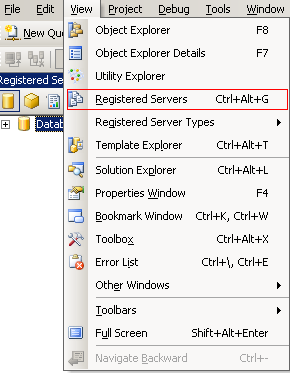
 Step 1: You might not be able to registered serves or see Central Management Servers in SQL Server Management Studio. To view them click on view in the menu bar and click on Registered Servers.

image

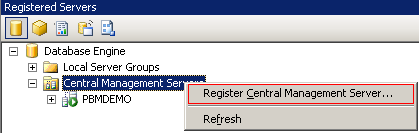
 Step 2: Now that you can see Central Management Server folder right click on it and click on Register Central Management Server. This will allow you to designate a server as your Central Management Server.

image

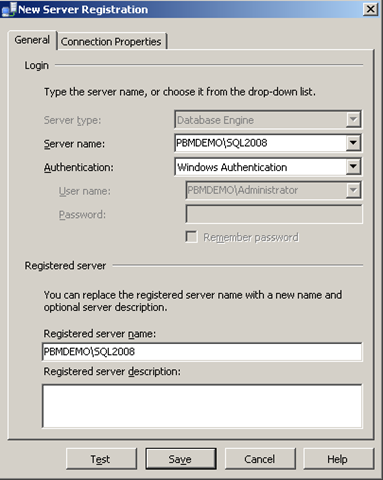
 Step 3: Register your new CMS. In this example I am going to use PBMDEMO\SQL2008 as my Central Management Studio. Once you enter the name test the connection and then save your settings.

image

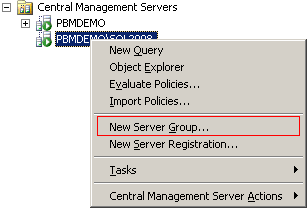
Step 4: Now that the PBMDEMO\SQL2008 Central Management Server is configured lets add a group to hold development and production instances. This is done by right clicking on the instance (PBMDEMO\SQL2008) and clicking on New Server Group.

image

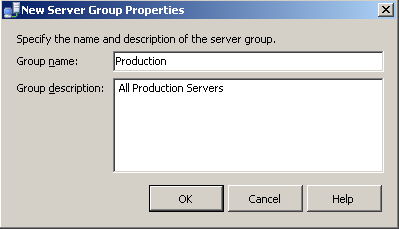
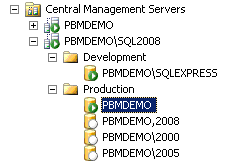
Step 5: Configure a folder for your production servers. We will use Production as the group name. This will be shown as a folder in the screen shot below.

image

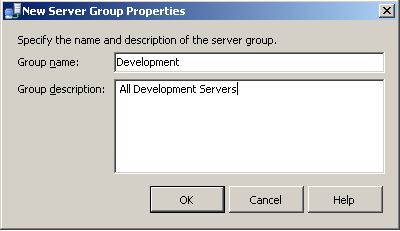
Step 6: Configure a folder group for your development servers. In this case we will add our SQL Express edition as a development server.

image

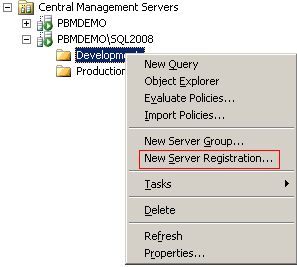
Step 7: Lets add our Express edition server to the development group. Right click on Development folder and select New Server Registration.

image

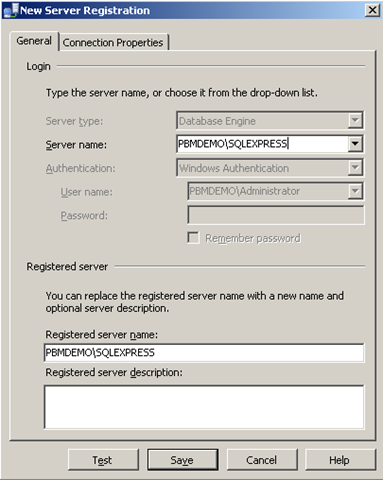
Step 8: Add PBMDEMO\SQLEXPRESS as the server name and test the connection. Once its successful save the connection. Lets now repeat steps 7 and 8 to add four instances of SQL Server to the production group (PBMDEMO, PBMDEMO,2008 and PBMDEMO\2005, PBMDEMO\2000)

image 

The screen shot above should be the final result for adding five production instances and one development instance. Come back later in the week as we show you how to leverage the CMS server to run and automate the execution of multi-server queries.

Get your learn on… May 2011

May is a great month for DBA’s and developers in Pittsburgh, PA and Wheeling, WV. Here are some great events you should attend this month.

Pittsburgh, PA and Wheeling, WV

Update 5/10/2011: Included SharePoint meeting as recommended by John Scott.

Date Host Meeting
May 11th Greater Wheeling Chapter of AITP Blogging – what is it and why should I?
May 11th Pittsburgh SharePoint User Group Upgrading to SharePoint 2010: A Panel Discussion
May 16th Pittsburgh .NET User Group Visual Studio Product Tour
May 24th Pittsburgh SQL Server User Group Virtualization and SAN Basics for DBAs
May 26th WVPASS –Wheeling SQL UG Database Mirroring: The Bear Necessities

SQL Rally!

This week I will be getting my connect, share and learn on in Orlando, Florida at SQL Rally(yes, you can still sign up!). I cannot wait to connect with my friends in the SQL Server community.  I also look forward to making some new ones. I will be sharing my knowledge on “Evaluating your Daily Checklist against 100+ instances of SQL Server while you get a cup of coffee.” I will also be participating in the Mock Interview Overdrive session hosted by Kevin Kline.  I also look forward to learning from the vendors and some of the best presenters in the SQL Server community.

Speaking of vendors, I look forward to catching up with Confio, Idera, SQLSentry (bonus points for being a WVPASS sponsor), Quest, RedGate and DELL.  I also look forward to meeting new vendors like entrinsik, Enterprise Software Solutions, Melissa DATA.

I am sure I will have some ad-hoc changes but I still want to share my schedule for next week.

Day Event Description
Wednesday Free Day! There are some really good pre-con sessions. I might jump in one of these sessions or see the sites of Orlando.
  After-Hours Activities Beer, Wings and SQL Networking  at Buffalo Wild Wings
  After-Hours Activities Pirate’s Cove for miniature golf.
Thursday Morning Session I The Dirty Dozen: PowerShell Scripts for the Busy DBA – Aaron Nelson
  Morning Session II Visit the SQL Rally vendors!
  Morning Session III Understanding Storage Systems and SQL Server – Wes Brown
  Lunch! WIT Luncheon and Panel Discussion
  Afternoon Session I T-SQL Code Sins: The Worst Things We Do to Code, and WhyJennifer McCown
  Afternoon Session II Writing faster queries – Tim Chatman
  Afternoon Session III SQL University: Lightning TalksJorge Segarra
  SQLRally OverDrive
Conducting an Interview – Participating
  After-Hours Activities meet up at nearby Old Town
Friday Morning Session I Big and Tall: When to Partition – Kendra Little
  Morning Session II Prepare for my presentation and visit vendors!
  Morning Session III Evaluate your daily checklist against 100+ instances of SQL Server while you get a cup of coffee – ME!
  LUNCH!!  
  Afternoon Session I Deadlocking for Mere MortalsJonathan Kehayias
  Afternoon Session II Windows PowerShell Best Practices for SQL DBA’s – Ed Wilson
  Afternoon Session III Fundamentals of SQL Server InternalsJeremiah Peschka
  Vendor Raffle