I want your vote for #SQLRally

Hello Everyone, I am John Sterrett coming to you from Wheeling, WV and I need your vote for SQL Rally! I need your vote because I eager to share what I have learned about Policy Based Management and Central Management Server in the past four months.  This presentation will give people the knowledge they need to start evaluating a daily checklist.

Let me take a step back for a second and explain. I am currently responsable for over 100+ Instances of SQL with more than 3,000 databases.  We rarely didn’t evaluated a daily checklists against all of our production databases until I learned about Central Management Server and Policy Based Management.  Now, I can evaluate my daily checklist in the amount of time it takes to get up out of my seat and brew a cup of coffee.  I am eager to show you multiple ways to start evaluating your checklists.

What is SQLRally?

 SQLRally is PASS’ new regional event that fills the gap between our free PASS SQLSaturday 1-day training events and PASS Summit, the world’s largest conference for the SQL Server community. One of my favorite parts about SQLRally is that the community votes for the presentations.

Hopefully, I will be selected to speak at the first annual SQLRally. Regardless, I look forward to presenting this abstract at user groups, virtual chapters and  future SQL Saturday’s. In fact, I am giving this presentation at SQLSaturday in Houston this Saturday. If you would want me to deliver this abstract or one of my other presentations contact me.

How do I vote?

 Click here to vote. You will see my session under the fifth group (PBM).  You get two votes for this catagory so I will also recommend Jorge Segarra  (Blog | @SQLChicken) because I wouldn’t be using PBM without his contrubutions to the community.

What am I voting for again…..

Evaluate your daily checklist against 100+ instances of SQL Server while you get a cup of coffee

Abstract

You will walk away from this session with an understanding of how to use the Policy Based Management and Central Management Server to complete a daily checklist against your whole SQL Server farm. We will cover the basics to evaluate, monitor and apply best practice policies, which are included out of the box with SQL Server 2008. We will also make custom policies to cover additional best practices to evaluate daily checklist items. Finally, we will combine Policy-Based Management and Central Management Server with the Enterprise Policy Management Framework on codeplex to automate the monitoring process and create manager friendly reports to monitor your checklist items against the whole SQL Server farm.

Deliverables

  • You will be able to install and configure Central Management System
  • You will be able to use CMS and/or PBM to complete a daily checklist
  • You will be able to evaluate and build custom policies.

Session Prerequisites:

Session prerequisites assume you are familiar with SQL Server Management Studio, have an instance of SQL Server 2008, and that you have administrative access with SQL Server. You don’t have to be familiar with Policy-Based Management or Central Management Server, you will learn the basics during this session.

Related Posts:

Un-SQL Friday #2 – My Tech Giants

UnSQL Friday #2

The second round of UnSQL Friday is here and the topic is so good I am typing while I eat lunch rushing to beat the deadline to get this in. UnSQL Friday was created by Jen of @MidnightDBA’s to provide an avenue for SQL Bloggers to focus on a non-technical topic. The topic is as follows:

“Read this blog, and then write whatever you want about Tech Giants. Be sure to mention in your blog that you’re writing for Un-SQL Friday, and link to this post. Oh, and have it up any time before the weekend (Saturday Jan 22) hits, mmkay?”

Jen said, to write about whatever I want so here we go!  I am using this venue as an opportunity to say thanks to a bunch of people who have helped become who I am today. I will also explain how they fit into my definition of a Tech Giant.

There are several other people I could include but I have a deadline so I will have to find another way to thank them later.

What is a Tech Giant?

This definition is subjective and will be defined differently from blogger to blogger so here is my definition. To me a Tech Giant is someone I look up too within IT; someone who has helped me out; someone who is mentoring me; someone who is mentoring me without even knowing that they are mentoring me.

In no particular order here is a list explaining why these individuals peeps are my tech giants:

David Hoerster, Eric Kepes & John Hidey

David Hoerster, Eric Kepes & John Hidey: These are three stand up .NET developers who are highly involved in Pittsburgh .NET User Group and the Pittsburgh code camp for years. To this day I will always remember my first code camp four years ago. The next year they gave me my first public speaking opportunity. Every year the Code Camp in Pittsburgh gets bigger and bigger. This year there were two code camps with over 150 attendees.  David, Eric and John showed me first hand how important it is to give back to your technical community.

Side Note: How the heck are none of these guys a Microsoft MVP? This almost makes me question the MVP program. I am going to do my part in correcting this by nominating them at the Microsoft MVP site.

Thomas LaRock aka SQLRockStar

Tom LaRock: Last year Tom asked the community if anyone wanted to have a mentor on his blog.  I jumped on this opportunity and we have been skyping (is this actually a word?) monthly. His book (check out my review) and those sessions have shaved years off my learning curve moving from a developer to becoming a valuable Production DBA.

I finally meet Tom in person at the 2010 SQL Pass Member Summit. He introduced me to almost everyone in the community that week. It’s weird, in a way I feel like he is my older brother from another mother.

Tom also has a great blog. In my opinion it’s one of the most entertaining technical blogs out there because he does a good job teaching with stories. A perfect example is “Everything I Needed to Know about Waits and Queues I learned From the TSA.”

Side Note: Other than his addiction to bacon and being a Patriots fan he is a great guy! Can you tell I am a die hard Pittsburgh Sports Fan?

Brent Ozar

I love this book!

Brent Ozar: I ran into Brent virtually two years ago at the Pittsburgh SQL User Group. At the end of his presentation he challenged the crowd to start blogging. I found his intro to blogging series and gave it a try.  A little later I was hooked.  Brent made me a syndicated blogger at SQLServerPedia. People will see this blog post because he took a chance on a new blogger.

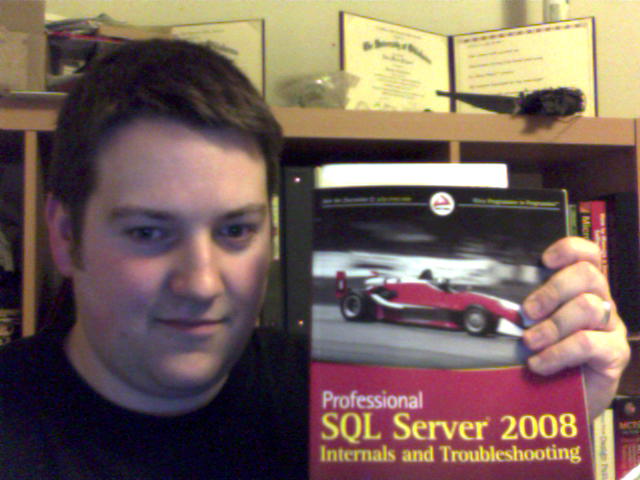
Its amazing how much time and energy he puts into the SQL PASS Community with his presentations and blog posts.  His blog is a great resource for SQL Server, Professional Development, Speaking and Blogging.  Did I mention that he also co-authored one of the best SQL Server books (its the image on the left side)?

Side Note: I am working on creating a VMWare Workstation image right now due to his blog post on “How to rehears a Presentation.” Brent, I will be shooting you some question soon 🙂

Andy Warren

Andy Warren: The first SQL Saturday in West Virginia wouldn’t have happened without Andy’s help.  Andy and I had several phone calls where he gave me the guidance I needed to make it happen. He helped me from the point where I wondered,can I make this happen up to the week of the event.  Now, I have spoken at three SQL Saturdays and am adding another one to the list next week.  I don’t think this would have happened without Andy’s support.

Side Note: At SQL PASS Summit I learned that Andy is referred to as the godfather of SQL Server. I am not sure why this is true. I will have to follow-up with more at a later date.

Justin Siebert

Justin Siebert: There is no way I am going skip the great state of West Virginia. And there is no one better qualified than Justin. He started his own consulting company to provide Online Marketing and Search Engine Optimization. He now does business with Fortune 500 companies.  He is a big supporter of LAMP and is doing great things with WordPress.  His website is a perfect example.

Once he found out I was interested in blogging he talked me into using WordPress. Justin gives me several tips on WordPress and SEO and has never asked for money.   He also pulls me aside every once in a while to make sure I am focused on my goals and heading down the right path.

Side Notes: some people call Justin by his name. I call him the SEORockStar.  Justin and I might be the only remaining die-hard Pittsburgh Pirates fans left in Wheeling (Yes the owner Bob Nutting also lives in Wheeling).

What I am reading in 2011- week two

This year I am going to try to keep better tabs on what I am reading on the intertubes and why I found the posts interesting.  Here is my first list of the year.  I hope you enjoy these links.  I know I did.

Writing a Technical Blog: Why to do it and what to write about – Kendra Little (blog | @Kendra_Little) wrote a great post for someone who is technical and is thinking about blogging. Actually, If you work within IT and don’t blog you should really read this blog post!

Cloud Computing for IT Pros – My local IT Pro Microsoft Evangelist Youg Chow produced this is a  six part series going over the basics of cloud computing for IT pros. It starts with defining what is a service.

New SQL User Group in Wheeling, West Virginia’s first meeting is January 20th

If you caught my last blog post and reached the bottom of the page then you noticed that we are starting the first SQL Server User Group in West Virginia.   Last year we hosted our first SQL Saturday and drew interest for a user group.  I have teamed up with a few local friends and we are excited to see where our user group goes.

If you would like to attend our first meeting click here to signup so we will have pizza for everyone.

The Mission

The mission of the Wheeling SQL Server User Group is to provide an opportunity that will allow database developers, database administrators and all other IT professionals who work with databases to connect, share and learn for free. While everyone’s shop might be unique the majority of the DBA’s have similar projects and problems. We will allow all attendees the opportunity to share their experiences while they can also build their soft skills.

Our First Meeting

Our first meeting will be held on January 20th, 2011.  Everyone who attends will be an instant winner as there will be free pizza and free membership to the coolest organization for SQL Server Professionals. We are excited to have Jose Chinchilla (blog | @SQLJoe) speak. The following is our agenda:

  • 6:00pm to 6:15pm – Network and eat free Pizza
  • 6:15pm to 6:30pm – Establish a few goals for the group and eat more free pizza
  • 6:30pm to 7:30pm – The Main Event (Learning SSIS under 1 hour)

Abstract:

Need to know what is the corresponding SSIS transformation or task to a specific T-SQL statement? How do you accomplish Unions, Joins, and Merges in SSIS? How do you do CASE statements in SSIS? How do you group and aggregate data in SSIS? In this session I will cover the some of the most important SSIS control flow and data flow tasks to jumpstart DBAs and Developers into SSIS with SQL Server 2008-R2. At the end of this interactive demo, you will be able to identify what control flow tasks and data flow transformations can be used in place of T-SQL statements and scripts. I will also cover how to accomplish in SSIS:
• Basic SELECT, INSERT, DELETE, UPDATE statements
• Inner and Outer joins
• CAST and CONVERT
• CASE statement • Sorting, Grouping and Aggregate functions (SUM, COUNT, MAX, AVG)
• MERGE and Unions
• Loops (WHILE) and more

Bio:
Jose Chinchilla is a Microsoft Certified Database Administrator and Business Intelligence Developer working as a BI consultant for a Tampa based full service consulting firm. Jose has12+ years of experience in IT and has focused his career in OLTP and OLAP database design, development and administration and specializes in ETL/ELT, Data Warehousing and Multidimensional Analysis using SQL Server 2008 BI tools. He is also the current president of the Tampa Bay area Business Intelligence User Group and Official PASS Chapter. He is an avid twitterer under the @SQLJoe handle and blogs at http://www.sqljoe.com.

First SQLSaturday in Wheeling, West Virginia was a Success!

After SQL Saturday #36 on May 1st 2010 my wife and I headed to Spain.  Somehow this post got lost in the shuffle when I got back. I thought it is important to share my thoughts of the event so here it is.

The first SQLSaturday in West Virginia can be summed up in two sentences.  The SQL Server Community is bleeping awesome.  The Ohio Valley is bleeping awesome. I know unfortunately I will leave some people out but I would like to thank the following individuals for their advice and support Andy Warren, John Parkinson, Thomas LaRock, Jeremiah Peschka, Justin Siebert, Joelle Ennis, and The Greater Wheeling Chapter of AITP.


Its now a little past a month six months after the first SQLSaturday in West Virginia and I am glad to share my thoughts on the event.  First, I would like to say we held it down for the DBA’s in the small cities who have dreams of hosing a SQLSaturday.  Don’t quote me on this but I believe we are the only SQLSaturday host city with a population under 50,000.

When we first started this mission in November 2009 our goal was to have 50 to 100 people register.  We actually had registration at 100 and had 70 people attend.  We had three tracks that delivered 16 13 sessions presented by 11 9 speakers.

Things that worked

  • Using WVNCC as venue – The West Virginia Northern Community College campus in Downtown Wheeling allowed us to use their facility.  We had the ballroom which held 100 people, two class rooms held 50+ and two smaller class rooms that held 30 attendees. This was a great fit and we are very grateful that they hosted the meeting for us.
  • Volunteers – We had a super all-star team of volunteers on hand for the SQL Saturday. Did I mention that the volunteers were awesome? There were, and they all did a great job.
  • Selected Speakers – All of the speakers did a great job.  The evaluations showed that everyone appreciated the presentations. We need a better way to deliver results to speakers. We will work on that for next year.
  • Lunch – The box lunches from Panera Bread were a hit.  The food arrived as scheduled.  One of our volunteers was also arranged to have the Catholic Charities pick up the leftover food.  Once again, did I mention that our volunteers rock?

Things that need improved

  • Get more people involved – While we had plenty of support for the big day only two people did the majority of the pre-day work. Hopefully, we can get more people involved earlier next year.
  • Build Higher Goals –  Our venue can support more people. We tried our best to keep it simple because we didn’t know what we were doing as this was the first major information technology event in Wheeling, WV for years. Now we know what we are doing so we should try to go buck wild next year.
  • Evaluations – I will take the blame here and say that we failed.  We didn’t have a good system for generating feedback.
  • More Speakers – We cut it close with filling up our three tracks. Next year I we will need to be more active with pulling speakers.  If you are interested in speaking next year contact me and I will get you on our contact list.

Thanks to the speakers

We would like to give a shout out to all the speakers for making SQLSaturday in Wheeling happen.  You were all awesome.  Check out their blogs and tweets.

Thanks to the sponsors

Whats Next?

  • 2nd Annual SQL Saturday in West Virginia – This is correct, we are excited to give it another run and are targeting June 2011. We will shoot out an update to let everyone know when we have an official date.
  • Wheeling SQL Server User Group – Hey John there is no SQL Server User Group in West Virginia what are you smoking?  First, I don’t smoke and second there will be. Our first meeting will be on January 20th. Check out my blog during the first week of January for more information.

Related Posts:

Policy-Based Management Myths Series Finale

Welcome to the Policy-Based Management myths finale.  Do to some great questions at SQL Saturday # 61 in DC I am going to focus on some myths that come up with Policy-based Management.  Today is the final installment, you can catch the other myths below.

You cannot use Policy-Based Management with SQL Server 2008 R2 Express

Just like the two other myths the answer is true and false.  This one, really through me for a loop mainly because I don’t normally use SQL Express. With that said, if you want to store or use SSMS to create a policy while connected to SQL Express instance the answer is false.  If you want to evaluate an existing SQL Express instance the answer is true.

Why can’t I create policies or store them in SQL Express 2008 R2?

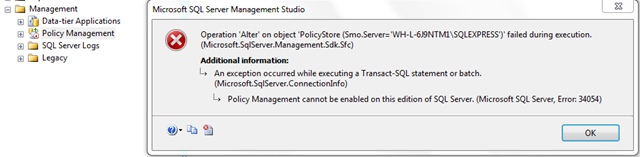
When I read the following article on SQL Server 2008 R2 Express site I would think that the flexible section make it seam like you could store and create policies with that edition of SQL Server.  Unfortunately, you will notice that Policy-Based Management is disabled. This isn’t too bad, lets just enable it.  Oh snap……….  You get the friendly error message that states, “Policy-Based Management cannot be enabled on this edition of SQL Server.”

image

How do I evaluate policies against SQL Express 2008 R2?

So, I cannot enable Policy-Based Management on SQL Server 2008 R2 Express edition can I still evaluate and apply changes to this instance of SQL Server? Yes, you can, once you have your policies built you can use Central Management Server to evaluate and apply changes.

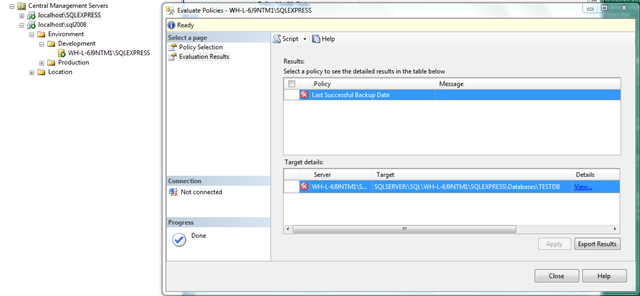
Below is a screen shot of me evaluating the built-in “Last Successful Backup” policy against an instance of SQL Server 2008 R2 Express.  You will see that it fails because well I don’t use Express so I don’t have the databases backed up.

image

Note: There will be more to come in a future blog post on setting up Central management Server and using it to execute Policy-Based Management policies.

How can I build a policy to work against SQL Express 2008 R2?

Connect to another instance of SQL Server using, Standard,  Enterprise, or Developer to generate your policies via SSMS and store the policy on a central instance of SQL Server (not express) or on a file share.

Related Posts:

Policy-Based Management Myths (2 of 3)

A few weekends ago I gave an “Introduction to Policy-Based Management and Central Management System” at SQL Saturday 61 in DC. Do to some great questions I am going to focus on some myths that come up with Policy-based Management this week.  Check back through the week to catch all three myths.  Today we will cover the second myth.

By default a policy using the database facets will run against all databases

The myth is true and false.  Actually, using the default database target condition (every database) the myth is true. If you build your own condition for the target then the myth can be false.

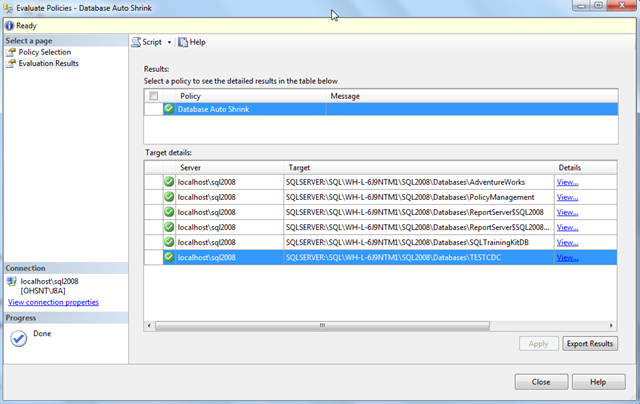
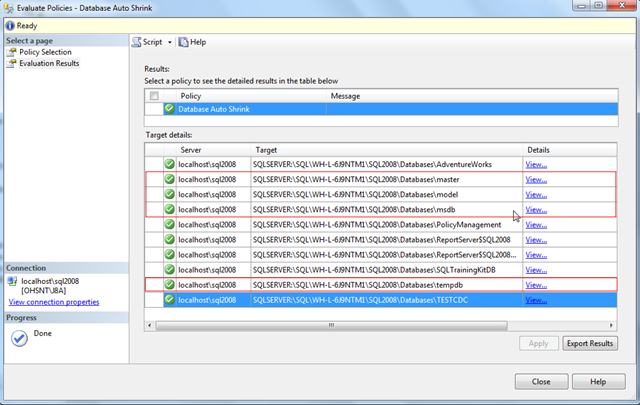
Lets take another look at the “Auto Shrink Database” policy that comes out of the box with SQL Server 2008. When you evaluate the policy you will see that the system databases (msdb, master, model, tempdb) are not included.

image

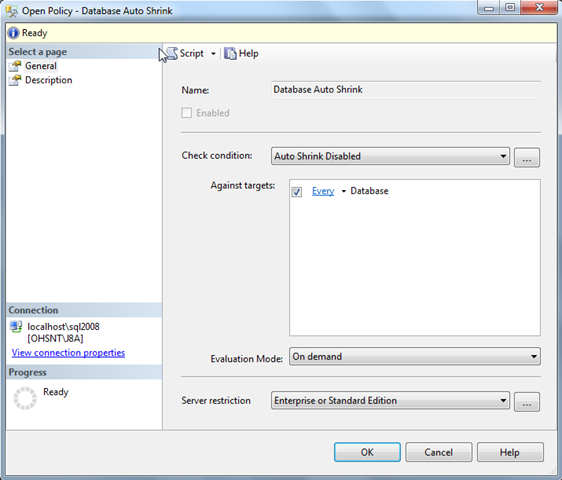
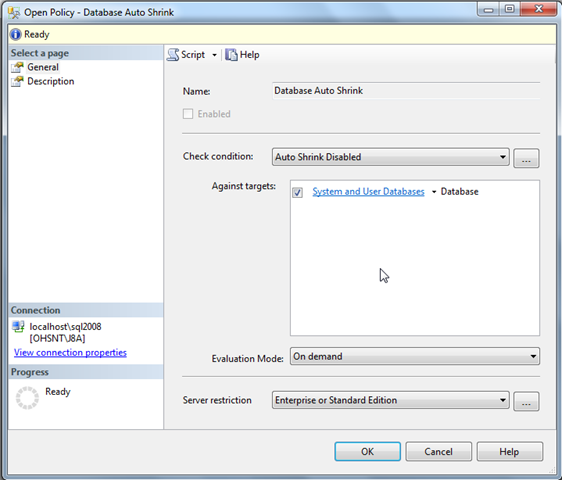
My first thought is to checkout the target properties.  Maybe for some reason the system databases are exempt.  Looking at the target below you will see that every database is suppose to be included.  Obviously, this means all databases are included, right? No, sorry system databases are not included.

image

How do I evaluate policies against all databases?

Lets create a new condition that we will use as our target condition.  In a nutshell we need a condition that shows all databases when they are system objects or are not system objects.  If you select the database facet you will notice there is an IsSystemObject field.  This is our ticket getting all databases.

image

Lets now change the target condition to use the condition created above. We will no longer have every databases as our target condition and select our new System and User Databases target condition.

image

Now lets evaluate the policy again.  You will now see all user databases and system databases as I expected when you used the default target condition.

image

Come back on Monday to find our last installment of the Policy-Based Management myths.

Related Posts:

Policy-Based Management Myths (1 of 3)

A few weekends ago I gave an “Introduction to Policy-Based Management and Central Management System” at SQL Saturday 61 in DC. Do to some great questions I am going to focus on some myths that come up with Policy-based Management this week.  Check back through the week to catch all three myths.  Today we will cover the first of the following three myths.

You cannot execute and apply policies against an instance of SQL Server 2000.

The answer is yes and no.  You can execute and apply policies against an instance of SQL Server 2000 if the policy executed runs against features supported in SQL Server 2000. This is easy to do if you have a central management server setup.  I will walk you through the steps below assuming a CMS exists.

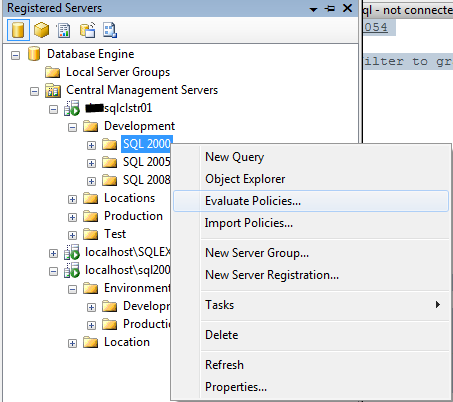
1. Right click on the node in your Configuration Management System that hosts your instances of SQL Server 2000 and right click and select evaluate policies as shown below.

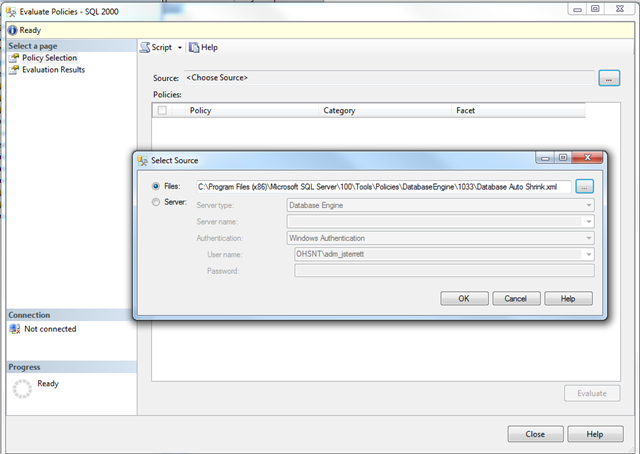
image2. Click on the ellipse next the source and select the policy files you would like to execute or select a sever where the policies reside.  In this example we will execute the Database Auto Shrink built-in best practice policy.  By default they are located at C:\Program Files (x86)\Microsoft SQL Server\100\Tools\Policies\DatabaseEngine\1033\. Once you have loaded the Database Auto Shrink policy click execute and the policy will be evaluated against every server in your CMS group.

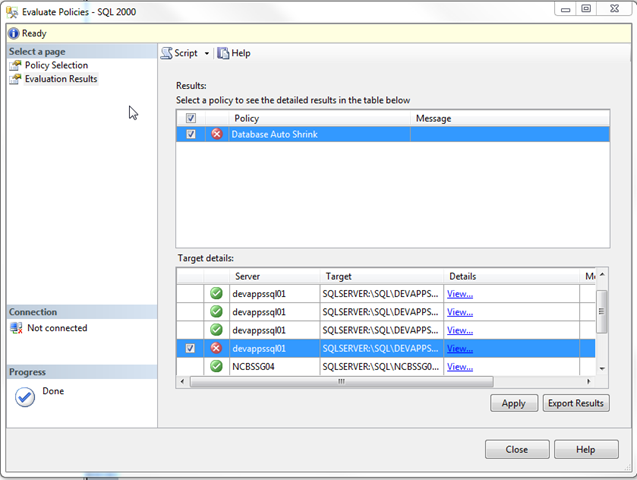
image3.   The following are the results of executing the “Database Auto Shrink” policy against a group of development SQL Server 2000 instances.  You will noticed that the policy failed as there are databases that have auto shrink equals true. We can click on the checkboxes and apply the policy to force the databases to be compliant with our policy.

image

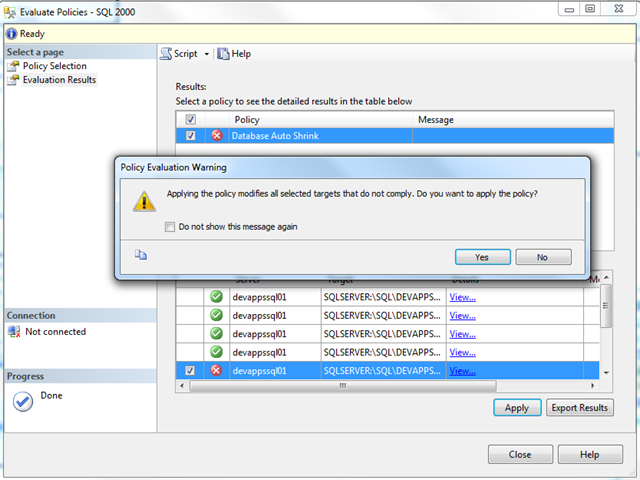
4. Click yes on the next popup screen will apply the policy to modify all selected targets that do not comply.  Make sure you want to do this before you apply the policy.

image

5. After selecting apply you should see that you were able to apply the changes to make your SQL Server 2000 databases are compliant with the policy.

Can you show me an example of a policy that will not work on SQL Server 2000?

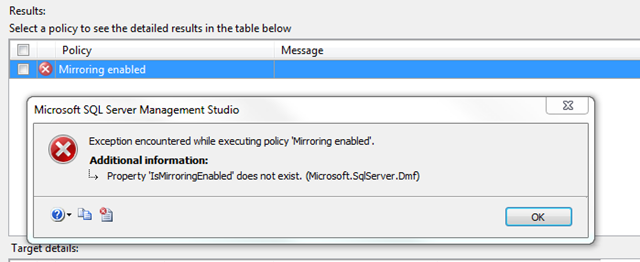
Database Mirroring is not supported in SQL Server 2000 as it was delivered in SQL Server 2005 SP1.  If you have a policy that checks to see if mirroring is enabled and you run it against a SQL Server 2000 instance the policy will fail.  In fact, you will receive an “Property ‘IsMirroringEnabled’ does not exist error.

image

Check back during the week to catch the next Policy-Based Management myth.

You don’t have to be an expert to speak

Brent Ozar recently posted a great blog post for people who are setting goals to speak in 2011.  His post motivated me to do one for people who are interested in speaking but don’t because they think you must be an expert.  I have a secret for you, I use to be one of those people. If you learn anything from me please check out the next sentence.  You don’t have to be an expert to speak in the SQL Server community.

I am not an expert but I stayed at a Holiday Inn Express last night...

I am not an expert but I stayed at a Holiday Inn Express last night...

I have proof that you don’t have to be an expert to speak.  I did a lightning talk at the world’s largest and best conference for SQL Server professionals and while I strive to be an expert I have a long way to go!

In my opinion speaking is just like playing any sport.  You cannot get better if you don’t get out there and practice, practice, practice. If you don’t practice speaking how can you become an expert speaker? The SQL Server Community is awesome and they have your back. There are several avenues for people to start speaking.  Experts are also willing to give you pointers along your way to help you get better.

What should I talk about?

This one is easy, talk about what you know. A list of tips or best practices you have discovered through your quest of SQL Server greatness would be a great start.   Recently, I have spent quite a bit of time figuring out how I could monitor and apply best practices to my SQL Server farm.  I compiled my notes and a presentation was born.

A well known speaker already submitted my topic

Submit your topic anyway.  Speakers usually submit multiple topics expecting to only do a couple presentations. If you submit your abstract it might get accepted so the other speaker can do another presentation.  Andy Warren (blog | @sqlandy) just wrote a blog post about missing an opportunity to speak. Andy thinks that  too many speakers is a good thing.

Where should I speak?

There are several options for you to  speak do your thing:

If you have never submitted a session to a User Group, SQL Saturday, Virtual chapter do it.  Trust me, if I can give a presentation anyone can.

Monitor your SQL Server farm with Policy-Based Management and Central Management Server

This past weekend I had a blast at SQL Saturday #61 in Reston, VA.  I gave a brand new topic on “Monitoring your SQL Server farm with Policy-Based Management and Central Management Server.” I showed everyone how I run my daily checklist. In fact, its usually done in the amount of time it takes me get a cup of coffee.

Slides and code

My slide deck, Intro to PBM and CMS is available for you to download.  The zip file also includes two scripts I run against our Central Management Server while I get coffee.

Links

You can also find several links that I used to learn Policy-Based Management and Central Management Server here