SQL Server Automatic Tuning in the Real-World

In SQL Server 2016 we saw Query Store.  Query Store was a game changer to help database administrators identify troublesome queries. Query Store helps DBAs make those queries run faster.  Microsoft’s marketing team even jumped on to help coin the phrase, “SQL Server It Just Runs Faster.” With SQL Server 2017, this started to get even better with automatic tuning. Don’t worry database administrators.  Automatic Tuning will just enhance your career and not replace it.

SQL Server 2017 Automatic Tuning looks for queries where execution plans change and performance regresses. This feature depends on Query Store being enabled. Note, even if you don’t turn on Automatic Tuning you still get the benefits of having access to the data. That is right. Automatic Tuning would tell you what it would do if it was enabled.  Think of this as free performance tuning training.  Go look at the DMVs and try to understand why the optimizer would want to lock in an execution plan. We will actually go through a real-world example:

Automatic Tuning with SQL Server 2017

First, let’s take a quick look at the output of the data. You can find the query and results we will focus on below.

SELECT reason, score,
      script = JSON_VALUE(details, '$.implementationDetails.script'),
      planForceDetails.*,
      estimated_gain = (regressedPlanExecutionCount+recommendedPlanExecutionCount)
                  *(regressedPlanCpuTimeAverage-recommendedPlanCpuTimeAverage)/1000000,
      error_prone = IIF(regressedPlanErrorCount>recommendedPlanErrorCount, 'YES','NO')
--INTO DBA.Compare.Tunning_Recommendations
FROM sys.dm_db_tuning_recommendations
  CROSS APPLY OPENJSON (Details, '$.planForceDetails')
    WITH (  [query_id] int '$.queryId',
            [current plan_id] int '$.regressedPlanId',
            [recommended plan_id] int '$.recommendedPlanId',

            regressedPlanErrorCount int,
            recommendedPlanErrorCount int,

            regressedPlanExecutionCount int,
            regressedPlanCpuTimeAverage float,
            recommendedPlanExecutionCount int,
            recommendedPlanCpuTimeAverage float

          ) as planForceDetails;

I will break the results down into two photos to make them fit well in this blog post.

Free Tuning Recommendations with Automatic Tuning in SQL Server 2017

Free Tuning Recommendations with SQL Server 2017 (1/2)

Automatic Tuning Results in SQL Server 2017

Free Tuning Recommendations with SQL Server 2017 (2/2)

Now we know in the query store query_id 2271 has CPU time changing from 7,235ms to 26ms. That’s a big difference. Let’s take that query and look at its findings by using the tracked query report inside SSMS.
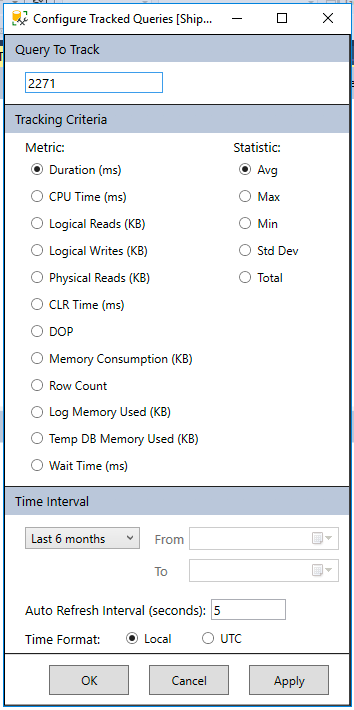
Query Store find history of a query

Find my Changed Query. Did the plans change?

Here we can see the major difference between the two execution plans. One is averaging over 14 seconds in duration while the other is under a second.
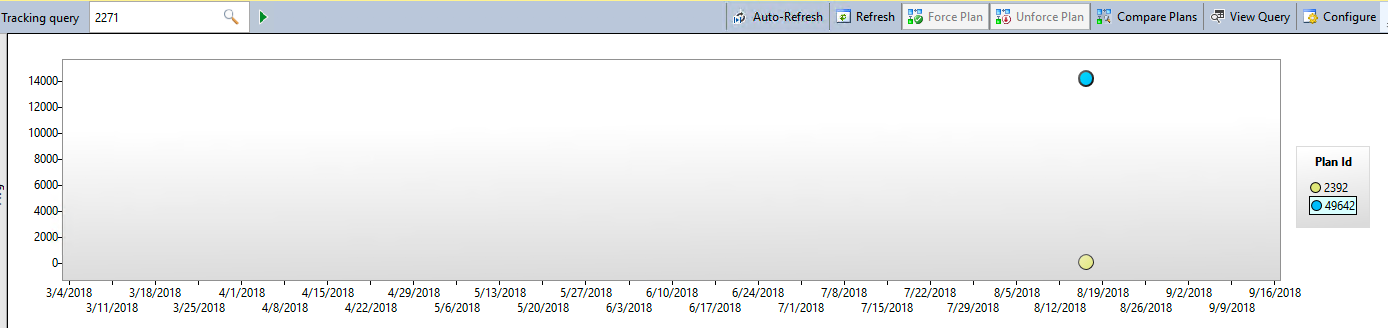
Reviewing Query performance in Query Store

Query Store showing the performance difference between the two plans

Now we can select both plans on the screen above and look at the execution plans side by side inside of SSMS. When doing so, we see the common example of the optimizer determining if it is better to scan an index vs a seek with a key lookup.

Side by Side Execution Plan Review in SSMS.

Using SSMS to compare auto tuning recommended query.

To complete the example I want to point out that automatic tuning would lock in the index seek plan (Plan 2392). In SQL Server 2016 you can do this as well manually inside Query Store. With SQL Server 2017 it can be done automatically for you with Automatic Tuning. If you have ever woken up to slow performance due to an execution plan changing and performance going through the drain this might be a life saver.

If you would like to learn about performance tuning changes in SQL Server 2016 and 2017 sign up for our newsletter or catch me talking about these features at SQL Saturday Denver and SQL Saturday Pittsburgh this month.  If you need any help with tuning or upgrading contact us. We would love to chat with you!
 

Why We’re Organizing SQL Saturday in Wheeling, WV on April 28th

Some of my friends know I am a huge fan of the song “Havana” by Camila Cabello. They also know I like to remix songs and if I was to remix the song I would just change the word “Havana” to “Wheeling, WV” because half of my heart is in the Ohio Valley.

Why?

Wheeling is where I grew up as an adult and to this day it is one of the special happy places I like to visit. On April 28th Wheeling will host their the third SQL Saturday. Anyone can attend for FREE! l look forward to sharing my favorite city with the SQL Community and my SQL Family.

Free SQL Server Training in Wheeling, WV

Free SQL Server Training on April 29th in Wheeling, WV

Procure SQL will be teaming up with the Wheeling Chapter of AITP (only IT group in Ohio Valley) to bring some expert SQL Server training from MVPs, MCTs, and community experts to the Ohio Valley. I hope Data Platform professionals in nearby cities like Columbus, Pittsburgh, Harrisburg, Cleveland and Washington DC join is un the fun as well.

Things to Do?

Check out this quick five-minute video to find out some of the great things you can do in Wheeling, WV and why I fell in love with Wheeling!

Food

Colemans Fish Market – It is #1 on TripAdvisor for a reason. Best-fried fish sandwiches.
Ye Old Alpha – The Bridgeport brownie is legendary good.
DeCarlos Pizza – Wheeling’s special version of Pizza. If you get it make sure to eat it quick. Locals typically will eat it on the hood of their cars.
Undos – My personal favorite Italian food restaurant.

Places to See:

Good Mansion Wine – If you like wine, the selection here is fantastic. They will also have an open wine tasting event April 27th at 6 pm. If you are looking for something fun to do the night before the event I would recommend this.
Suspension BridgeIf you like history. You have to check out one of the oldest suspension bridges in the USA. You can still walk and drive across it.
Wheeling Artisan CenterGreat small tour of the history of Wheeling, WV.
Center Market
– Historic part of town with a lot of shops and places to eat. Its an easy walk from the SQL Saturday venue.
Oglebay Resort – Depending on the weather the driving range or ski lift will be open. Seriously, a great five-star resort with epic holiday events including Christmas lights, ogalbayfest, and 4th of July.
Wheeling Island Casino – If you like to play cards and win money its a great location. Used to do it a lot on lunch breaks.

SQL Saturday Chicago

Last weekend I had a blast speaking at the SQL Saturday in Chicago. It was awesome to share my knowledge and also catch up with some good friends.  My talk was on Automating the Pain Away with Query Store and Automated Tuning.  I hope this session helped people leverage Query Store and Automated Tuning to resolve their parameter sniffing problems.

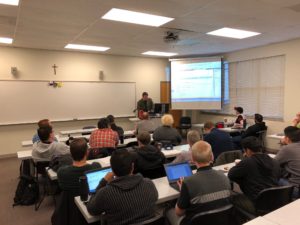
John Sterrett Teaching Performance Tuning

John Sterrett teaching Performance Tuning at SQL Saturday Chicago

John Sterrett teaching performance tuning

SQL Saturday Chicago training class


Finding Top Offenders with Extended Events

This week at MVP Summit I got to talk with a friend who loves profiler. We were talking about capturing workloads and doing analysis on them. T-SQL or other 3rd party tools like ClearTrace, ReadTrace would be used to aggregate the data to get insight into the top offenders. I mentioned that workload analysis could be done with extended events without writing a single line of T-SQL.  This was a lightbulb moment for him.  Quickly, I learned that he is not alone and that there are a lot of people in the community who didn’t know this either.

I am including a quick video below to show you why Extended Events is a great solution for finding top offenders in a workload.


T-SQL Tuesday #096: The Group Who Changed My Career Forever!

T-SQL Tuesday #96: Folks Who Have Made A Difference

T-SQL Tuesday #96: Folks Who Have Made A Difference

Today’s blog post is about T-SQL Tuesday.  If you haven’t seen T-SQL Tuesday before its a great monthly call for all SQL Server bloggers to write about one topic that always changes from month to month.  In this months installment, we’re focusing on folks who made a difference.

Looking back,  I wrote about this subject almost seven years ago.  While I covered a lot of great people there is a group left out. I wished I included them because they were the first to believe in me, mentor me, and help me become the IT Pro I am today.

Being A SQL Server MVP you might think I would focus on data people.   I am actually going to focus on a forgotten IT organization.  This would be the Association of Information Technology Professionals or AITP for short.  In fact, its really for my local chapter the Greater Wheeling Chapter of AITP (GWC of AITP). For those who didn’t know I grew up as an adult in Wheeling, WV.

The Greater Wheeling Chapter of AITP taught me how to be the best IT Professional I could be. While I attended to eat great food and to learn tech. I learned a whole lot more. I learned that it’s the people who matter and that technology will always change. I started to learn how to lead here as well.  I became a chapter president, heck even became the VP of the region.  I learned a lot of skills here that helped make me the IT person and business owner I am today.

When I wanted to bring SQL Saturday #36 to Wheeling, WV the whole Greater Wheeling AITP Chapter helped and supported me. Even though none of us knew what we were doing.

Earlier this year, Dolph Santorine the current President of GWC of AITP had a speaker cancel. In a bind, he asked if I could do a webinar to help. I refused to do the webinar because I told him I would jump on a flight and be there to do it in-person.  During this trip, over a Bridgeport brownie, I learned there might be another way I could pay things forward back to the GWC of AITP.

How I Will Payback Those Who Helped Me

The GWC of AITP could use another great event to raise awareness and drive up membership.  I will be using my knowledge and #sqlfamily to help bring a third SQL Saturday to Wheeling, WV. 

That’s right, we’re going to go from SQL Saturday #36 to #717 with a good old Throwback SQL Saturday. Save the date: April 28th. Like the old days, this will be a low budget grassroots event that brings some of the best SQL Server training to West Virginia. We are going to prove again that if a SQL Saturday can happen in Wheeling, WV it can happen anywhere!

I look forward to showing my data friends why Wheeling, WV is one of my favorite places in the world! You will quickly see that Wheeling is very different from your typical American small town.


SQL Server 2017: Making Backups Great Again!

In some DBA circles, backups are just as popular as politicians! However, recoverability is the most important task for database administrators.  While SQL Server 2017 added so many great features like graph, SQL on Linux, and more.  Today, I want to focus on two small underdog features that might be game changers on how you do backups.

SQL Server Backups are often as popular as politicians.

SQL Server Backups are often as popular as politicians.

Smart Differential Backups

Databases are getting bigger, not smaller. More storage capacity is needed for these backups. Backup compression might hurt your storage capacity. Today, I am seeing more policies include full and differential backups along with transactional log backups. Differential backups are used to offset daily full backups. Typically people will use time increments as the basis for when backups should occur.  It’s very common to see automated jobs that do weekly full and daily differentials to reduce storage capacity needed for backups.

How often does your data change? Is the rate of change very consistent or does it change depending on the week?  Let’s assume this week it’s Tuesday and over 80% of your data pages have changed. You are not benefiting from taking daily differentials for the rest of the week. The opposite goes for data that doesn’t change that often.  Maybe you can save a lot of space by doing less frequent full backups.

Leveraging smart differential backups could greatly reduce your storage footprint and potentially reduce the time it takes to recover.

In SQL Server 2017 you can see exactly how many pages changed since your last full backup. This could be leveraged to determine if you should take a full or differential backup.  Backup solutions and backup vendors will be better for this.

select CAST(ROUND((modified_extent_page_count*100.0)/allocated_extent_page_count,2)
as decimal(6,2)) AS 'DiffChangePct'
,modified_extent_page_count
,allocated_extent_page_count
from sys.dm_db_file_space_usage
GO

Smart Transactional Log Backups

 The time your users are offline while you are recovering to the point of failure is critical. It could be the difference between keeping and losing customers.  Point-in-time recovery is mandatory for a critical database.  Transactional log backups have to be restored in order.

Recovery Point Objectives (RPO) drive how often you take transactional log backups.  If you have a policy that says you can only lose ten minutes of data, you need transactional log backups every ten minutes. Is this really true if there were no changes? What if your RPO is driven by the amount of data loss and not the time of the loss?  Either way, you can now control when transactional log backups occur based on the amount of data that has changed since the last transactional log backup.

SELECT name AS 'DatabaseName',dls.log_since_last_log_backup_mb,
dls.log_truncation_holdup_reason, dls.active_vlf_count,
dls.active_log_size_mb
FROM sys.databases s
CROSS APPLY sys.dm_db_log_stats(s.database_id) dls


This post was written by John Sterrett, CEO & Principal Consultant for Procure SQL.  Sign up for our monthly newsletter to receive free tips.  See below for some great related articles.

Talking about Migrating to Azure SQL Database at #MSIgnite this week

Speaking on Migrating to Azure SQL Database at Ignite 2017

Speaking on Migrating to Azure SQL Database at Ignite 2017

This week I will have two talks on migrating existing database to Azure SQL Databases at Microsoft Ignite.  If you are there and curious about migrating your existing databases we would love to talk with you.

If you are attending or not attending you can use our Migration to Azure SQL Database Resource Cheat Sheet

My talk is Successfully Migrating Existing Databases to Azure SQL Databases.

Monday 4:35 pm in Hyatt Recency Theater – Level One

Wednesday 1:35 pm OCCC South – Expo Theater #8


Why is My SQL Server Execution Plan Changing and How do I fix It!

Speaking at Performance Virtual Chapter

Speaking at Performance Virtual Chapter

Have, you noticed an important query suddenly takes longer to run? Have you noticed the execution plan looks completely different than what you normally expect for your query? Today, I talked at the Performance Virtual Chapter going over how to identify plans that change and went over options to fix them in SQL Server 2005 to 2016 by forcing plans.

Where is the Code?

As promised, the demo code is attached here.

How Can Query Store Get Better?

I would love to see Query Store have the ability to capture statistics for AG Secondaries that are enabled for read traffic. A bonus, would be the ability to force plans for AG Secondaries as well.

Blue Screen Your SQL Server On-Demand

These days I do a lot of testing with SQL Server.  When I am testing new features or helping clients implement SQL Server High Availability solutions I want to have several tests including blue screens.

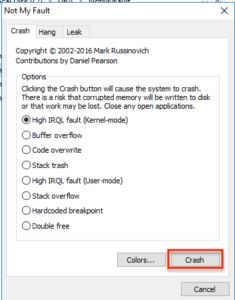
Simulating blue screens actually might be much easier than you think.  For example, you can use Not My Fault from the system utilities to create blue screens whenever your heart desires.

Blue Screen with Not My Fault

Do you really want to push that Crash button?

Just remember, if you use Not My Fault and click on the Crash button, It Aint My Fault.

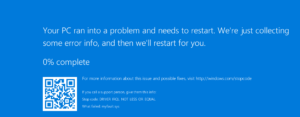
Instantly after clicking on the crash button you should see the following blue screen.

SQL Server Blue Screen on Demand

SQL Server Blue Screen on Demand

Looking Back: 2016 was Awesome!

With 2017 starting this week I would like to take a moment and reflect on 2016. I have to admit that 2016 was a great year for many different reasons, both personally and professionally. It’s nice just to stop and acknowledge some significant accomplishments that occurred last year!

2016 in Review

I always try to keep my Community contributions up to date here on my blog. I would have never gotten to where I am today without others who helped me along the way, so I am always happy to give back.  It’s been an honor to host another SQL Saturday in Austin for over 250 attendees, be a leader for the Austin SQL Server User Group and continue to grow the High Availability and Disaster Virtual Chapter to 2145 members.

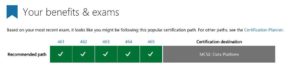
Professionally, it was also a great year in 2016.  I was able to obtain two major goals on my career bucket list. I completed the Microsoft Certified Solution Expert for Data Platform certification (Yes, my procrastination took me to the

Microsoft Certified Solution Expert on Data Platform

Microsoft Certified Solution Expert on Data Platform

last work day in 2016, but I got it done!).  As Tom LaRock says, “They do not hand out certifications like candy. You have to earn them.” I also was acknowledged as a Microsoft Data Platform MVP which goes to about 100 people in the USA.

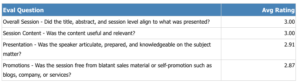
In 2016, I was also able to continue to grow as a speaker.  Once again, I was blessed with an opportunity to speak at the prestigious PASS Member Summit. I never take getting accepted lightly. This year even though I was sick and almost

Almost a perfect score for the biggest stage.

Almost a perfect score at the Superbowl for SQL Server Speakers!

had to cancel I was able to deliver my session while obtaining my best evaluation score to date (ranked 1 to 3).  I gave 15 sessions in 2016; my highest attended session of the year was at the Data Architecture Virtual Chapter to 457 attendees.

My company, Procure SQL LLC also achieved some great milestones in 2016. I was able to hire an employee, Angela Tidwell as our Marketing DBA. We were able to procure our very first office as well. Finally, after spending several hours working with an excellent health care broker, I was proud to announce that we were able to set up our very first group health plan at Procure SQL. While this isn’t required, it was a huge goal of mine to help make sure that our employees are taken care of as we grow in the future.

Personally, I was able to catch up with some great friends and spend some quality time with my family.  We took the family to Galveston, TX for our very first beach trip as a family.  I learned that it was Nina’s Dads first time in the Gulf as well.  Bonus; the weather was so nice in December my Brother and rootsportsroyjohndecided to bring our kids back for a weekend.  During my birthday weekend, I was able to see my Pirates and Wheeling Nailers in person in Dallas which is both very rare.   During the weekend I was able to hangout with one of my best friends from college.  We even made it on Root Sports Pittsburgh raising the jolly roger.
Finally, my loyalty with some friendships was tested in 2016. While one could have only focused on themselves,  I decided to help my real friends in need in 2016. I remember asking myself (yes I talk to myself), “what would I hope my friends would do for me in my hour of need?” I then tried to do that.

2017 Goals

These days, I am not a huge fan of publicly sharing my goals.  With that said, I wanted to share three goals to help keep me accountable.

Build Two Local Speakers

In the past, I have had the opportunity to help build some new speakers. I cannot think of a more rewarding experience in the SQL Community than helping someone grow. While I have more than two different people in mind, I hope to have at least two new speakers give their very first SQL Server presentations in 2017. Who knows? Maybe they will love it, and it can change their careers like it did for me.

Fill My Office

While I plan on getting us a fridge, when I say, “Fill My Office” I wasn’t just planning on filling the fridge with adult beverages. Our office fits one more person easily, and I hope to find that FTE employee in 2017.  I will provide more details on this later on as we get closer to that point of pulling that trigger.

Building Training Plan


Testing out the new office white board.

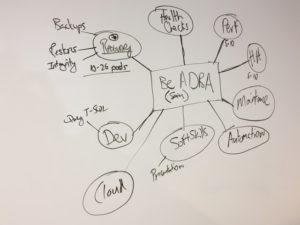
Literally, this was the first thing written on our new six-foot whiteboard

With the hiring of Angela last year, one of my goals was to build some high-Quality training material that could help someone become a SQL Server Database Administrator (DBA). I want this to be online content that could be used on demand to help as many people as possible to get a great start as a DBA. I hope to have this implemented in 2017.  It might also force me to get out of my shell and focus on building some great video content which will be a new challenge.