Category Archives: SQLServerPedia Syndication

This category is for SQLServerPedia Syndication

Pittsburgh Code Camp – SQL 2008 for Developers

This past weekend I presented SQL Server 2008 for Developers at the PGH.NET Code Camp.   You can download the slides here if you would like a copy.  You can also check out my scheduled speaking engagements.

The PGH.NET 2010.2 Code Camp was organized very well.  I want to give a big shout out to organizers as they did a great job.  My favorite session of the day was Scrum 101 with Eric Kepes (Blog | Twitter).  Personally, I knew very little about Scrum coming in to the presentation so this was a great opportunity for me to see how others have implemented it in their shops.  The presentation lead to some great debates.

If you would like to see Eric’s presentation or download a Scrum worksheet check out his blog post.

Rename Server Name for SQL Server Cluster

Recently I was given the task to rename the virtual name used by a SQL Server cluster.  To my surprise changing the virtual name is actually a easy task with SQL Server 2008 R2 on a Windows 2008 R2 Server.

Microsoft has a How to: Rename a SQL Server Failover Cluster Instance article that walks you though this topic.

Note:  This will not allow you to change an instance name so if you are not using a default instance name it will carry through.  For example if you use SQL2008 and connect using servername\SQL2008 you would connect using newservername\SQL2008.

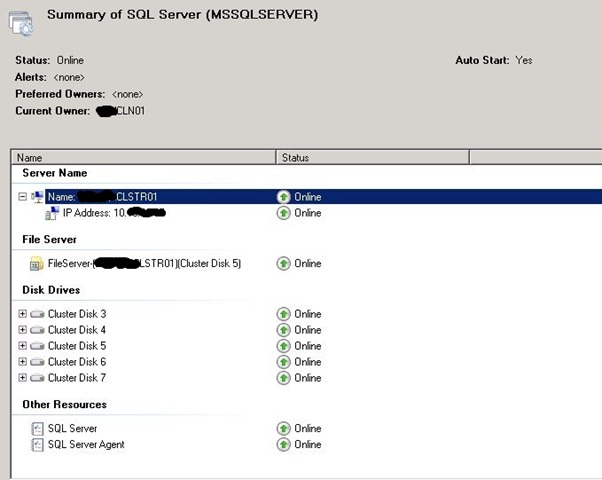
The following steps will show you how I changed the virtual name from CLSTR02 to CLSTR01.  Being a good DBA I tested this out on a development cluster before I will attempt implementing this in production.  The following were my steps.

Step 0: Yes there really is a step zero.  In this step you need to verify with your network and server teams that the computer names for your nodes have permission to to made DNS changes.  If this is done you will not need anyone on standby as cluster manager will take care of changing DNS entries.

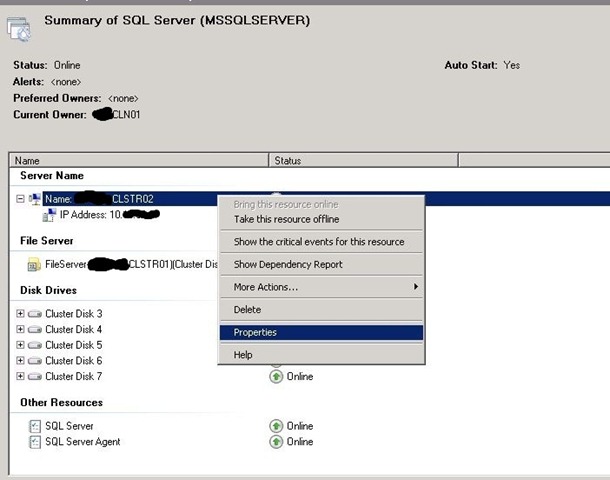
Step 1: Open up your Failover Cluster Manager and select SQL Server service.  Right click on the name and select properties.

SQLRenameCluster1

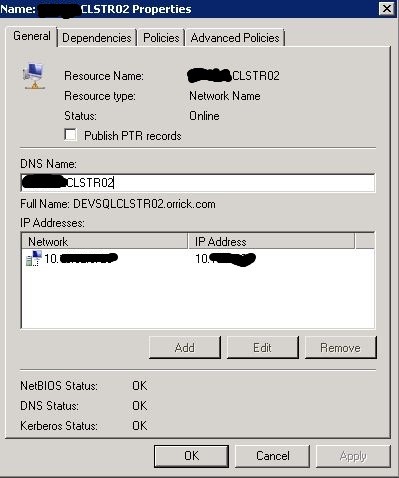
Step 2: Rename the virtual name specified in the DNS Name textbox.  In this case I will change the server name from CLSTR02 to CLSTR01.

SQLRenameCluster2

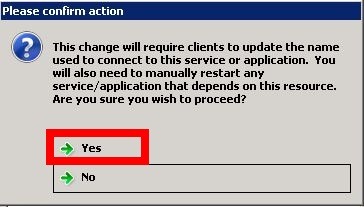
Step 3: Click yes on the confirm action popup screen shown below.  You will have to change all your applications to connect to the new name and restart any dependencies that fail to start. 

Note: I changed the name between CLSTR01 and CLSTR02 multiple times and only once SQL Server service didn’t come up online.  When this happened I just right clicked on the server and brought it online.
 SQLRenameCluster3

SQLRenameCluster4

Step 4: Change all your application that were connecting to CLSTR02 to CLST01.

Recap: #24hop (24hrs of PASS) – Day One

I am very happy that the committee behind #24HOP made two decisions.  One they decided to split the 24 hours into two days.  This is huge for people in the USA as we don’t have to pull all nighters.  Second, I am very glad day one fell on a Wednesday.  Why would I be exited it falls on a Wednesday?  I am excited because it is no pants Wednesday.  No pants Wednesday  means I don’t work on Wednesday’s so its very easy to attend sessions.

Day Two

If you didn’t catch it in the first paragraph there is a day two.  That’s right peeps you can still signup and attend some great sessions.  If you need some help picking a session or two I wish I could attend the ones listed below.

The following is a short review of the sessions I attended on September 15th 2010.

Gather SQL Server Performance Data with PowerShell

Allen White (Blog | @SQLRunr) showed a very slick way to automate the process of collecting WMI counters and save them in a database.  This alone was very slick but to add the icing on the cake he also showed the crowd how to build reports that work inside of SSMS.

My eyes were opened up wide when I saw how easy it was to do WMI and SQL calls with PowerShell.  I will defiantly check out http://powershell.com in the near future to get my learn on.

It looks like Allen has a great PreCon session for the SQL PASS Member Summit 2010 lined up that will get you well on your way with automating your DBA tasks.

Hardware 201: Selecting and Sizing Database Hardware for OLTP Performance

Glen Berry (Blog | @GlenAllenBerry) ran through tons of statistics behind selecting CPU’s, Memory and Disk’s for your new database servers.  I have to be honest quite a bit of this was over my head but below are a few items that stuck.

  • Optimize your hardware purchases to take advantage of your SQL and Windows Server editions
  • Don’t go cheap on CPU’s. You rarely upgrade the CPU unlike RAM or disks.
  • Xeon X5680 and Xeon X7560 were recommended CPU’s
  • SSD (solid state drives) are good for random writes (user data files) not sequential writes (log files)
  • 10K drives = 100 IOPS
  • 15K drives = 150 IOPS
  • Make sure High Performance is enable in power settings on your servers

Identifying Costly Queries

Grant Fritchey (Blog | @GFritchey) showed us several different tools you can leverage to identify costly queries.  He showed us how to setup SQL Profiler using stored procedures to lessen the load on your production boxes.  Grant also showed me a new tool I haven’t used before. This was the SQL RML Utility tool that can be helpful show how long a query really took.  Grant also showed us server DMV’s that can be used to get real-time understanding costly queries.

For some samples and resources used in the demo check out his resources blog page.

How to Rock Your Presentations

Douglas McDowell (Web | @douglasmcdowell) delivered the most important session for me.  This year I started to focus more on giving back to the community through technical presentations.  I am always looking for some tips that will improve my presentations.  The following were a few tips I plan to implement on my current presentation schedule.

  • Treat presentations like a development project
  • Storyboard each topic
  • Build an outline
  • Make sure to add RM, WIIFM and KWUC to all presentations.

You can find more in his PowerPoint presentation at http://downloads.solidq.com/DMcDowell/RockPASS_DMcDowell.zip

Conclusion

This was another great day of #24HOP.  The best part is it continues today.  The sad part is I will miss out on the sessions.  If you catch them and have good notes.  Please add them as a comment or blog them so the unlucky ones can check out the info.

Upcoming Speaking Engagements

With football season starting I thought I would share some travel dates.  If you are at any of the following events please don’t be shy and say hi.  I look forward to hitting the road and making some new friends as I continue to connect, share and learn.

Sept 18th : Reston, VA
Microsoft Regional Leadership Summit (Non speaking)

Oct 16th : Pittsburgh, PA
Pgh.NET Code Camp 2010.2 (SQL Server 2008 for Developers)

Oct 23rd : Dallas, TX
SQL Saturday #56 BI Edition (Submitted: SQL Server 2008 for Developers)

Nov 8th – 12th : Seattle, WA
SQL Server PASS Member Summit (Submitted Chalk Talk – SQL Server 2008 for Developers)

Nov 19th : Pipestown, WV
AITP Region 18 Fall Conference

Jan 29th : Houston, TX
SQL Saturday #57  (Submitted  SQL Server 2008 for Developers)

SQL PASS Summit 2010 on a Budget

The following is some information I would like to share with the community about how I plan to travel to Seattle for the SQL Server Pass Summit.  Please take my information with a grain of salt because this is the first time I am attending.  Everything below comes from research and tweets. If you are a regular please leave comments so others can see your travel tips.

Summit 2010

PASS%20Summit%20Banner%20300x300
Can we fast forward to November?

The SQL PASS Summit 2010 is the best opportunity for SQL Server DBA’s to connect, share and learn. Your first obstacle towards getting into the Summit is to well pay for general admission to the summit. You basically have two options here, either you pay the general admission fee (this is what I am doing this year) or you can get someone to sponsor you. A great option here would be your employer. Your employer also isn’t your only option for sponsorship. Speaking of getting someone else to sponsor you MSSQLTIPS and Idera is currently looking to send someone to PASS.  Give it a shot it could be you!

If you are paying for yourself you will want to pay ASAP because PASS has a sliding scale.  Just like many other conferences there is a price before sessions are announced and different prices as you get closer to the event.  You want to avoid paying at the door because the price is usually a lot more.

The following are some links that will help you save some money on attending the 2010 Summit.

How do I get there?

How you get to the PASS Summit will depend on your location and its distance to Seattle.  I  live in Wheeling, WV which is an easy hour drive to Pittsburgh so I will be flying.  If you are also flying you might want to checkout bing.com and setup email alerts to track the change in flight prices.  At this time I see that there are round-trip flights under $300 from Pittsburgh.

In order to travel through the Seattle Metro area check out the public transportation system.  It looks like they have bus, and a monorail.  The Seattle Center Monorail can take you from the airport to downtown for $5.00 round-trip.

Where Should I stay?

The PASS website recommends the following two hotels.

Looking at bing.com and  traveladvisor.com I found a few hotels within a miles of the convention center under $100 per night.  If you are trying to stretch your money I would recommend checking them out.

Do you have any friends that are attending PASS? If so, you might want to recommend sharing a room. This is a great way for you to split the costs of a hotel room.

Where should I eat?

If you are attending the Summit there is good news. Breakfast and Lunch is included daily. This means you will only have to worry about dinner.   There will also be some evening events where you might be able to snag a bite to eat.  On Monday night you can attend the PASS Summit 2010 Welcome Reception.  On Tuesday night you can also attend the Exhibitor Reception.

Another thought towards saving some $$ on dinner is to talk it up with the vendors.  They are there to get to know you and see if their products can solve your problems.  If your team has a budget for SQL tools (I really hope your team does) I bet you could convince a vendor to take you out to dinner.  Even if you don’t have a budget for SQL Tools I bet you could convince some vendors to take you out to dinner.  Remember most people in sales try to build relationships before they sell you on a product or idea.

Can you buy me a drink?

I never really was a big fan of beer and alcohol until I started my career in Information Technology (we will leave the company name out of this story). There were several internal functions to attend for networking and they all had beer.  I quickly noticed that all the bigwigs always had a beer in their hands. Being fresh out of college I followed suite and soon fell in love with beer (a trip with the wife to tour Samuel Adams in Boston also helped).

Anyways back to saving money. If you like to grab a drink (I defiantly fall into this category) it looks like its cheaper to go away from the convention center.

According to @SQLDBA its cheaper to go to the Tap House across the street from the convention center. If you also like to sample local beer the Rock Bottom Brewery is another  recommended place within walking distance from downtown.

What are your travel plans?

PASS Summit vets what am I missing? How else can people save some $$ on their quest to their first Summit conference? Let us know we are all looking forward to your recommendations.

Recap: PGH.NET August 2010 Meeting

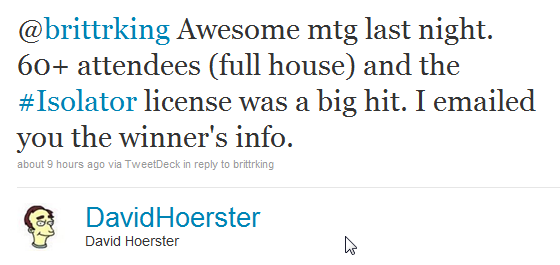
On August 10th 2010 I attended and presented at the PGH.NET User Group meeting named “5 Guys with Code.”  According to one of the PGH.NET leaders tweet it looks like the headcount was 60+

Twitter  David Hoerster @brittrking Awesome mtg la ..

The following are some thoughts and highlights from the presentations.

Presentations

  •  
    • John Sterrett (Blog | Twitter) – Table Value Parameters with SQL Server 2008 and Microsoft .NET  
  • I presented a feature that is included in SQL Server 2008 and underused by many developers.  This presentation shows developers how to pass a  DataTable, DataReaders and Lists to SQL Server database objects with only two extra lines of C# or VB.NET code. 

    As promised below are some reference links

  • David Hoerster (Blog | Twitter) – jQuery Code Snippets in Visual Studio 2010

Time is money and David’s fifteen minute tip might just save you a lot of time and money.    He covered several tools that will help you generate some awesome JavaScript. 

I  really liked the jsFiddle.NET tool.  It looks like a great tool to mockup some a user interface (more on user interfaces later).

  • Rich Dudley (Blog  | Twitter ) – A Quick Look at the New SQL CE Engine

Being addicted to databases I very happy to see that I wasn’t the only one presenting a topic based on databases.  Rich did a great job explaining what SQL CE can do and what it cannot do. 

Rich blogged about his experience (post includes photos, slides and more)

  • John Hidey (Blog | Twitter) – Layout Controls for XAML

I have to admit that XAML and I don’t get along well.  We had a fling a few years ago.  XAML cheated on me and I haven’t been the same since.

Ok seriously, I tried XAML a few times and found it very hard to understand.  John did a great job going over the common things that are hard to understand when you get started with XAML.   John started with some very basic controls and then built a final example that included all the basic controls.

At this summers PGH.NET Code Camp we had a speakers session where one of the presenters said, “Code is considered legacy code when TDD is not applied.”  Eric bowling for TDD example showed how anyone can start developing TDD.

Moving SharePoint to the data center

I cannot speak for the whole legal industry but where I work a lot of people love some SharePoint.  It’s like 50 Cent says, “We love SharePoint like a fat kid loves cake.”  And trust me we love some cake.  With this mad love of SharePoint comes great collaboration and with this great collaboration comes tons of binary files stored in a database.  What does this mean to the DBA? SharePoint now consists of VLDB’s

Hmm… How do we move the VLDB’s across the USA and keep them in sync?

With the built in features of Log Shipping, database Mirroring, Transactional Replication with SQL Server I knew it was possible to migrate the databases and keep them in-sync.   At the time I wasn’t exactly sure of the best way to do this so I used the bat phone.

While some people love SharePoint I love Twitter. Twitter allows me to communicate with several great DBA’s.  For example, I used #sqlhelp which is the equivalent of getting Batman on the bat phone.  This time it was Brent Ozar ( Twitter | Blog) who confirmed my gut feeling that Log Shipping was the way to go.

So…. How do you do it?

The complete process I used is documented at mssqltips #2073.  This tip walks you though the process of 22 steps to get the job done.  I hope this tip helps out other DBA’s that need to migrate VLDB’s from one location to another location without using third party tools.

If you have any comments or suggestions please forward them along.

Resolving Very Large MSDB

The following is the a walk-through guide towards how I resolved a problem with a MSDB that went wild.  I strongly recommend never shrinking database files.  I am not alone on this.  If you need more reasons check here (If you don’t like that example see the ones used in that post).

Unfortunately I am in a situation where I didn’t have another option.  We didn’t have a process on a server to delete records from the tables used to log SQL Server Agent job information. This database server in particular has over 400 databases and hourly transactional logs and a full backup.  This alone will create 10,000 rows daily when logging the results.  We actually reached the point where the data drive free space was consumed.

Backup MSDB

First, step is to do a full backup of MSDB.  You should always make a backup before you plan on doing any changes with a system database.  You should also have a plan to restore the system database just in case you have to implement it.

So Where’s the Beef?

Next, I needed to know why this database was so huge.  I ran the following query to see the file size of all database objects within the MSDB database. You can find this query written by Jeremy Kadlec in MSSQLTIP #1461 I also highly recommend reading that tip as it will provide some more helpful information to troubleshoot a large MSDB.

SELECT object_name(i.object_id) as objectName,

i.[name] as indexName,
Sum(a.total_pages) as totalPages,

sum(a.used_pages) as usedPages,

sum(a.data_pages) as dataPages,

(sum(a.total_pages) * 8 ) / 1024 as totalSpaceMB,

(sum ( a.used_pages) * 8 ) / 1024 as usedSpaceMB,

(sum(a.data_pages) * 8 ) / 1024 as dataSpaceMB

FROM sys.indexes i

INNER JOIN sys.partitions p

ON i.object_id = p.object_id

AND i.index_id = p.index_id

INNER JOIN sys.allocation_units a

ON p.partition_id = a.container_id

GROUP BY i.object_id, i.index_id, i.[name]

ORDER BY sum(a.total_pages) DESC, object_name(i.object_id)

GO

Dam you sysmaintplan_logdetail

Okay, we tried to using sp_maintplan_delete_log and it failed because the transaction log grew and consumed all the space on the drive for transactional log files.  We are not allowed to take the SQL Server database engine offline so we go with the next best option truncate the tables in question and shrink the database.

Yes I know……  I said shrink the database.  I actually had to slap myself  after typing this.

I found this great post on msdn that walks you through the script to truncate the sysmaintplan_logdetail table.


ALTER TABLE [dbo].[sysmaintplan_log] DROP CONSTRAINT [FK_sysmaintplan_log_subplan_id];

ALTER TABLE [dbo].[sysmaintplan_logdetail] DROP CONSTRAINT [FK_sysmaintplan_log_detail_task_id];

truncate table msdb.dbo.sysmaintplan_logdetail;

truncate table msdb.dbo.sysmaintplan_log;

ALTER TABLE [dbo].[sysmaintplan_log] WITH CHECK ADD CONSTRAINT [FK_sysmaintplan_log_subplan_id] FOREIGN KEY([subplan_id])

REFERENCES [dbo].[sysmaintplan_subplans] ([subplan_id]);

ALTER TABLE [dbo].[sysmaintplan_logdetail] WITH CHECK ADD CONSTRAINT [FK_sysmaintplan_log_detail_task_id] FOREIGN KEY([task_detail_id])

REFERENCES [dbo].[sysmaintplan_log] ([task_detail_id]) ON DELETE CASCADE;

Shrink MSDB

Now I know you followed the first step and backed up your MSDB.  Once again you should never consider truncating or shrinking data if you don’t have a working backup that can be restored.

Okay now that we are done with the disclaimer I created the following script to truncate the log and data files.


--- SHRINK THE MSDB LOG FILE

USE MSDB

GO

DBCC SHRINKFILE(MSDBLog, 512)

GO


-- SHRINK THE MSDB Data File

USE MSDB

GO

DBCC SHRINKFILE(MSDBData, 1024)

GO


Rebuild Indexes

Now that you did the nasty and shrinked the database data file you need to rebuild your indexes and update your statistics.   You can find the scripts to do this below.


-- REBUILD ALL INDEXES

USE MSDB

GO

EXEC sp_MSforeachtable @command1="print '?' DBCC DBREINDEX ('?', ' ', 80)"

GO

-- UPDATE STATISTICS

EXEC sp_updatestats

EXEC sp_helpdb @dbname= 'MSDB'

How do we prevent this from reoccurring?

Well actually there are quite a few things that could have and should have been done.  We could create a maintenance plan to clean up the SQL Agent history, we can also specify in the agent’s properties to also clean up history.  I will show you how to do both below.

The following is the maintenance task that will help cleanup the agent history tables.

Cleanup History

You can also right click on the SQL Server Agent in SSMS and select properties.  Once the properties window comes up select History on the list on the left.  You will then be able to remove data by record size or date.

AgentCleanHistory

24 Hours of FREE SQL Server Training

On May 19th there will be 24 live back-to-back presentations including ones highlighting new features provided in SQL Server 2008 R2 and more.  I attended parts of the 24 hours of PASS last year and was blown away by the content.  If you work with SQL Server I highly recommend you attend.   You can register online now at http://www.sqlpass.org/24hours/2010/

The following speakers are lined up for this great event.  Adam Machanic, Andy Leonard, Brad McGehee, Brent Ozar, Brian Knight, Chuck Heinzelman, Dean Richards, Don Kiely, Don Vilen, Donald Farmer, Glenn Berry, Greg Low, Jacob Sebastian, Jessica Moss, Kevin Cox, Kevin Kline, Louis Davidson, Maciej Pilecki, Peter Myers, Peter Ward, Rushabh Mehta, Sean McCown, Simon Sabin, Thomas Grosher

Watching Paint Dry
Watching Paint Dry

“But John I have to do xyz watch the paint dry on May 19th and the 20th.”

That’s fine, it looks like these sessions will be recored and made available through PASS within two months.  If you access the event this way you can watch 24hrs of PASS and the paint at the same time 🙂

A good friend of mine Thomas LaRock(blog | twitter) is organizing this bad boy.  For more information check out his post or the 24 hrs of PASS site.  I know it will be a big hit!

DBA Survivor, Becoming a Rock Star DBA

In today’s world many companies want and need their employees to do more with less resources.  You might find yourself in a position where you start to manage databases while doing many other tasks.  Thomas LaRock’s book may  save you countless hours.  If you are starting and your goal is to be a Rock Star DBA this book might be one of the best investment you can make to have a successful career as a Database Administrator.

During the first week of January I moved from .NET Developer and part-time accidental DBA to full time DBA and PeopleSoft Engineer.  While this book just came off the shelves I still found it very interesting six months after I landed the job as a Database Administrator.  I agree with Brent Ozar, this book is tailor made for someone moving into a DBA role.  I also still think that it has useful information for someone like myself, someone who wants to understand what a Database Administrator does, or someone who has thoughts of becoming a DBA.

Favorite Quote

Tom does a great job giving you great information but he also throws in entertaining stories and great quotes.  While many readers will like the “shards of broken glass comment” quote my favorite is what you (the DBA) have in common with the President.  I would paste the quote below but that would ruined the fun.  I will tell you this, it’s hilarious but also at the same time very true.

Checklist

Checklists are very important to help automate processes and to make your life easier.  Heck sometimes they are as important as life and death.  For example, when a pilot is about to fly a single engine jet plane they have a checklist to complete before they go in the air.  Tom’s checklist for your first 100 days on the job is essential to make sure you have safe travels and are out of harms way once you get in the air with your DBA career.

No One Knows Everything

If you have not learned this lesson yet I highly recommend you do it now before its too late.  Tom explains why it’s just not possible to know everything.  He also provides some examples on how you can find the answers to what you don’t know.

Connect, Share, Learn

Within my five year career in IT I have had the pleasure to work at a major consulting firm, a dot com, and a global law firm.  What is the constant with these three environments?   There are a lot of the people in IT who prefer to stay in their cubical and communicate the least amount as possible. Tom explains not only why you want to break this trend but also includes some benefits.

Where is the Buffet?

Surprisingly this was the most important chapter for me. The goal of this book is to make sure you have a long successful career as a DBA.  This is not possible if your life is cut short due to health issues.  When your profession demands that you sit in front of a computer screen it’s easy to make some bad decisions that can put your health in jeopardy.  This was a wake up call for me. I am pushing 300 lbs and am glad to get back on the right track so I can have a long successful career as a DBA.

So there you have it.  If you are new into the DBA game or know of someone who is seriously considering becoming a DBA get this book.  You can find it at amazon.