Category Archives: SQLServerPedia Syndication

This category is for SQLServerPedia Syndication

Let’s Meetup [Updated]!

I have a confession to make. I like to meet people who also work with SQL Server. There are so many different ways to use SQL Server. I love to hear how people are using it differently than me.  One of the easiest ways to accomplish this is to connect with people and start a conversation at SQLSaturday’s, User Group Meetings and PASS events like SQL Rally coming up in Dallas in May. Once upon a time, I would attend similar training events and was so shy I didn’t connect with anyone. Why didn’t I connect with anyone? Mainly, because I was afraid. If this is you, you are not alone I was in the same place as you. In fact, let’s meetup at one of the events listed below.

NOTE: The following schedule has been updated on May, 17th 2012

SQL Saturday #107 (Houston, TX) on April 21st

I will be presenting my Evaluating your Daily Checklist with PBM and CMS presentation. I always look forward to SQL Saturday’s in Houston as this gives me the opportunity to visit my family and my #sqlfamily in the same trip. If your in Houston its not too late to sign up.

WVPASS (Wheeling, WV) May 24th

I will be presenting “DBA’s use RML Utilities to help get your next raise!” If your in Pittsburgh or Morgantown area make the drive out. Anyone, can still signup for this free event. Not only will you learn how to prove that your new indexes or application upgrade will improve performance but you will get free pizza. As a bonus, you will also get to meet some cool DBA’s in Wheeling, WV.

SQL Satuday #117 IN COLUMBUS, OH ON June 2nd

I am looking forward to my first SQL Saturday in Columbus, OH. I will be giving my Performance Tuning for Pirates presentation. Columbus is only a two hour drive and I hope to bring #babybeluga and the wife out with me. I think they would have a blast at the Columbus Zoo.

SQL Saturday #121 in Philadelphia, PA on June 9th

Do we really need to say more?  I cannot wait for SQL Saturday in the city of brotherly love.  The schedule hasn’t  has been posted and I will be giving my Performance Tuning for Pirates presentation. I look forward to learning, connecting and sharing.

Pittsburgh SQL Server User Group (Pittsburgh, PA) on June 26th

I will be presenting, “Performance Tuning for Pirates!” in Pittsburgh. Pittsburgh has a great SQL Server User Group and it’s always an honor to present for this group.

Performance Virtual Chapter – June 28th

I will be presenting, “Performance Tuning for Pirates!” Being that this is a virtual chapter I will not be presenting in person. This doesn’t mean that we cannot connect and chat.  We always have twitter so send me shout out before or after the session.
#tsql2day – Contained Databases are sexy and they know it!

This month Nigel Sammy (blog | twitter) is hosting this months T-SQL Tuesday and the chosen topic is  What do you think is a useful feature of SQL Server 2012? Therefore, I am going to write about a topic that isn’t getting much pub in the streets like AlwaysOn Available Groups or Columnstore. But that’s okay because Contained Databases are sexy and they know it!

Contained Databases

A contained database is a database that is isolated from other databases and from the instance that hosts SQL Server. Why could this be helpful? Well lets think about logins. What happens when you migrate a database from one instance to another? You have to copy over the logins and unorphan the logins if they are orphaned.  Wouldn’t it be nice to keep the logins contained in a database so they weren’t depended on logins created on the instance? I think so, especially for some third party applications that think they need sysadmin access.  Now why would I be worried about databases moving between instances? This is where Always Avaiable groups come in. I know what your thinking, he just lied and is talking about Always Available groups. Yep, your right but here is my point.  If the users are contained users for a database belonging to an Always Available group, during a failover, people would be able to connect to the secondary without creating logins on the instance hosting the secondary. This was a cool lesson learned quickly while building my virtual sandbox to test Always Available Groups.

Before you consider using contained databases you have see if your user databases are able to be a contained databases. If you are using replication, change data capture, or change tracking then contained databases may not be for you. As always, review Books Online for more details and make sure you test this out in development before using it in production.

Bonus – Get your Learn On!

Are you interested in learning more about SQL 2012? Do you wonder where you can find free resources? If so, the links I am using are included in this paragraph to help you brush up on the good stuff. You can download a free book, get your hands dirty with several virtual labs, view several videos and demos, Watch recorded sessions from #24HOP and attend the Microsoft Virtual Academy SQL 2012 training sessions.

24 Hours of PASS – Get your free downloads!

I am speaking at 24 Hours of PASS

I am speaking at 24 Hours of PASS

Thank you to everyone who attended my #24HOP session on Performance Tuning for Pirates! You can now download my slide deck, t-sql queries, and view my reference links.  If you have any questions about the tools presented feel free to contact me and I will  try to help you out or point you in the right direction.


Move the Quorum Disk Group

Recently, I worked on a project to migrate data from a four node cluster (3 active, 1 Passive) from an old SAN to a new SAN using SAN Copy by EMC. Once, the data was copied I failed the services around and verified that each service would work on each node. Here is how I moved the quorum disk to each node.

To move the quorum disk group you have to run the command listed below in the command prompt. Make sure you run the command prompt with Administrator rights or you might see an access is denied error.

Cluster group “Cluster Group” /move:<newnode>

If the cluster disk group was active on the db1 node and you wanted to migrate the group to db2 you would use the command below in the command prompt.

Cluster group “Cluster Group” /move:db2

If you like this post check out  my post on renaming the server name for a SQL Cluster or my other cluster posts.

6 ways to get free SQL Server 2012 Training

I always get excited when a new version of SQL Server gets released and rumor has it that  SQL Server 2012 will be released on March, 7th 2012. Why do I get excited? Well its quite easy, I know that each new release includes new features. These new features make my job easier. How do I know that these new features make my job easier? I know because I test them out and attend training sessions to see how other people are using them.

This year Microsoft is teaming up with the Professional Association of SQL Server Professionals (PASS) to provide several opportunities to give free SQL Server 2012 training.   Here are six ways you can learn about SQL Server 2012 and it won’t cost you a cent.

Online Labs

I love to get my hands dirty and throw things against the wall and see what sticks. Microsoft provides several virtual labs that allow you to do this without worrying about your servers.  If you want to checkout upgrading to SQL 2012, AlwaysOn Availability Groups or Installing SQL 2012 on Windows Core they have labs up and waiting for you.

Special Ops Tour

If you like to physically experience a launch event and rub shoulders with others who are using SQL Server you have to take part in the Special Ops Tour.  The Special Ops Tour is a 12 city event where Microsoft experts and local DBA’s will show you the must use features coming in this new release.  You can still sign up now. Hopefully, there is an event near you.

SQL Server 2012 Virtual Launch

Microsoft is also providing an all day virtual launch on March 7th that will include several topics on Mission Critical Confidence, Cloud on your Terms and Breakthrough Insights.  You can review the agenda and there still is room to sign up.

24 Hours of PASS

Once again, PASS is gearing up to deliver another 24 hours of PASS on March 21, 2012.  For those who don’t know 24 hours of PASS is  an in-depth look at the hottest SQL Server topics over 24 back-to-back free technical webcasts. You can gain access to the best SQL Server training and several of these session will be focused on SQL Server 2012. For more information visit the 24 hours of PASS website. If you want to speak get your abstract submitted now. The deadline is today!

SQL Saturday

SQL Saturday is an all day multi-track training event for SQL Server professionals and those wanting to learn about SQL Server. These events are spread all across the USA and the globe.

User Group Meetings

User Groups are monthly or bi-monthly meetings held to allow PASS members to connect, share and learn on a local level. There are several User Group’s spread out across the country.  Do you wonder if there is a user group in your area? You can find all the user groups here.

Speaking at the Columbus SQL Server User Group

This week on Thursday, January 12th, 2011 a 6pm I will be speaking virtually at the Columbus, OH SQL Server User Group.  I will be giving an introduction to Policy Based Management.

If you are a chapter leader and would be interested in having me speak at your user group contact me.

Abstract

This talk will give you an introduction into monitoring SQL Server using Policy Based Management and Central Management System which is provided out of the box with SQL Server 2008. I will then show you how you can combine these features with the Enterprise Policy Management Framework on codeplex to provide monitoring for your whole SQL Server farm. This topic assumes you know nothing about PBM and CMS and will include lots of examples with only a few PowerPoint slides.

Top 4 ways I will contribute to the SQL Community in 2012

One of my friends, Tom LaRock asked, “What do you want to do for your #sqlfamily in 2012?” Below is how I plan contribute to the SQL Community, and my #sqlfamily in 2012.

  • Bring  SQL Saturday to a new city
    Anyone who knows me in the community knows I am a huge fan sucker for a SQL Saturday. I have had the pleasure of being a host, attende, and a speaker. This year I am looking forward to being a volunteer and sharing all my knoweledge to bring a SQL Saturday to a new city.  With that said, there is a city very close to me that has never hosted one.  The ball is already rolling and I look forward to helping this chapter host their first SQL Saturday in 2012.
  • Help Chapter Leaders
    Being a chapter leader I personally know it can be hard running a user group. I was very lucky and thankful to get a lot of help.  I look forward to helping other chapter leaders who can use a hand. I am willing to help connect leaders to a sponsors; help leaders find swag, find books, find a speaker or anyting else. I am game and looking forward to helping.
  • Give Virtual Presentations
    Typically I do at least four presentations a year.  To this point I have never done a virtual presentation. This will change shortly as I am speaking  at the Columbus User Group virtually this week.
  • Mentor
    I have been blessed with having good mentors in my career. Without them I wouldn’t be where I am today. There advice and guidence has been very valuable.  I reciently started mentoring a DBA but would more than willing to help others out. If you would be interested please shoot me an message.

2011 was a crazy year!

Now that we are finishing up the last few days of the year its time to take a few minutes and reflect on my accomplishments for the year. To be honest, looking back at the blog posts I have no idea how I completed so many mile stones.  Last year I privately established some long term goals and I knocked several items off my three year and five year plan in the first year.

Major Accomplishments in 2011

PASS Member Summit 2011 Ribbons

Vendor said, "Wow... it looks like you had a very big year. Would you like to attend our vendor party?"

My first child was born in February.  Typically having a child would slow you down but somehow I still completed several milestones. I have to give huge props to my wife for all her help and support.

This year I gave presentations at the first SQL Rally; the SQL PASS Member Summit; SQL Saturday in Houston, TX (presented multiple sessions); the Pittsburgh SQL User Group and several session at the West Virginia SQL Server User Group.

One of my good friends and I co-founded the first SQL Server User Group in West Virginia. I also helped relaunch the Pittsburgh SQL Server User Group and was truly honored to  speak at the relaunch event. I also organized the 2nd  Annual SQL Saturday in Wheeling, WV. Its was truly an honor to bring my peers and friends to my hometown for some free SQL Training (photos). Towards the end of the year I also became a PASS Regional Mentor for the Mid-Atlantic Region.

Personally, I also had the following accomplishments.  I was included in a local

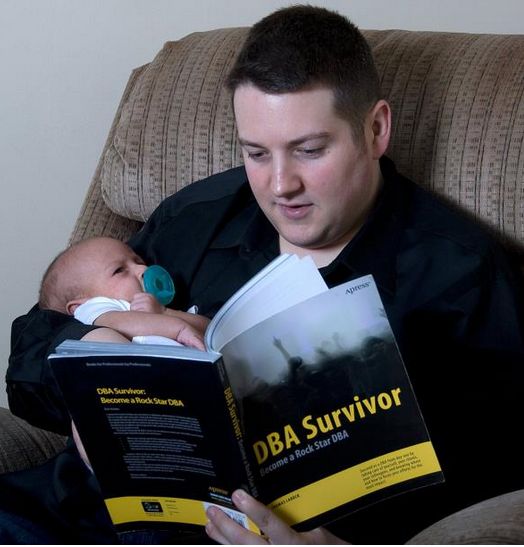
Reading with my baby

It's never to early to get started on your professional development.

magazine article on “Digital Generation.” Finally, I changed jobs and became a SQL Server Consultant.  I am truly blessed to say that many of these milestones couldn’t happen without my #sqlfamily and  my tech giants mentors .

My 11 Favorite Blog Posts in 2011

The following are my favorite blog posts and tips written by me in 2011.

I look forward to sharing some goals next week as we break in the new year!


PASS Member Summit 2011 Speaker Evaluations

Session evaluations from the 2011 PASS Summit have been officially released to speakers. I am proud to share my feedback as it gives me room for improvement. I look forward to making it back in 2012.

The evaluation format is as follows. Each question is rated on a scale of 1-5 (1 = Very Poor, 2 = Poor, 3 = Average, 4 = Good, 5 = Excellent) with room for additional comments if the attendee  felt compelled to add more information about why they gave a particular score.

Here’s how I fared:

Topic: Evaluate your Daily Checklist Against 100+ instances of SQL Server while you get a cup of coffee
Attendance: 138
Total Responses: 68
Average Rating: 4.4 out of 5.0

How would you rate the Speaker’s presentation skills? 4.19

  • very good clear speaker good pacing
  • it seemed like he did a lot of reading from the notes. he’s off to a good start though
  • alittle more zoomit. overall very good & easy to follow
  • He seemed pretty nervous, but he soldiered on.
    He also used ZOOMIT when appropriate and diligently repeated the questions for the recording.
  • good use of demos

How would you rate the Speaker’s knowledge of the subject? 4.51

  • great command of content
  • sounds like he has set PBM/CMS up a few times at least…knows the stuff
  • Another 10-15 minutes would have allowed for a little deeper explanation/understanding of the material, but it’s Friday and my brain is almost completely fried. (You have to love the honesty in this one! )

How would you rate the accuracy of the session title, description and experience level to the actual session? 4.49

  • I didn’t see any incorrect information
  • can’t wait to suss out some of the code snippets
  • demos clearly showed topic & idea

How would you rate the quality of the presentation materials? 4.35

  • demos clearly showed topic & idea
  • too simple…i would rather go over good primalry mangt. the tool i can learn myself..maybe less demo more presentation
  • wish we had more time on this subject
  • can’t wait to suss out some of the code snippets

Did you learn what you expected to learn? 4.47

  • thank you for the kick start into cms
  • i had no idea what PBM was now i know and want to apply it.
  • currently only rely on failure emails…no know of a better way
  • demos clearly showed topic & idea

What will you take away from this session?

  • Some good stuff. I’ll be beefing up my PBM when I get back.
  • Great info!!
  • I will be implementing what we learned
  • Implement PBM and CMS
  • hoping to implement some checklists on our newly built comps and streamline our “care and feeding” process
  • go back to office and try it out
  • make a list, check it, automate, central management, server
    policy based management
  • impliment idea. a way to automate checklist & protect my environment practically
  • cant wait to try!
  • how to use PBM & CMS. great session!!
  • a daily checklist can be automated and easily analyzed with a few simple tools

What would you change to improve the overall quality of this session?

  • Provide handouts
  • Presenter could have managed off topic questions from audience better.
  • speaker peppered with quite a few “in the weeds” questions, but managed them well.
  • could use alitte humor
  • change this to a 300 level based
    leave questions until end too many people aske the same questions over again, over something that was covered

Conclusion:
I think I did a good job for presenting my first full session at the PASS Member Summit.  Several people mentioned in the comments that they were going to try PBM and CMS.  This completed my mission for giving the presentation.  I also received some great feedback that I will implement to make my presentation better. I think this was a great experience for me and I look forward to doing it again next year if I get selected.

T-SQL Tuesday: What’s Currently Running?

My good friend Allen White is hosting this months installment of #TSQL2sDay so I am motivated to jump in. #TSQL2sDay is the creation of Adam Machanic. The concept is simple, about a week before the second Tuesday of the month a theme will be posted.  Any blogger that wishes to participate is invited to write a post on the chosen topic and any post that is related to both SQL Server and the theme is fair game.The challenge for this month’s T-SQL Tuesday is: What T-SQL tricks do you use today to make your job easier?

What’s Currently Running?

One of my favorite tricks is actually just a little script I have in my toolbox to find out what queries are currently running right now. In fact I have had quite a few people ask me the for this script so I am glad to share it in this blog post.  With SQL Server 2005 and above  SQL Server provides Database Management Views that give you direct access to executing requests and running process. The following query uses sys.dm_exec_request, sys.sysprocesses. We will also use cross apply to get the query text from sys.dm_exec_sql_text and the execution plan from sys.dm_exec_query_plan.

The Good Stuff…

{UPDATE: 1/1/2012 – Replaced sysprocesses with sys.dm_exec_sessions as recommended by Phil in the comments

UPDATE: 6/5/2013 – Changed CROSS APPLY’s to OUTER APPLY’s so we capture statements without execution plan or SQL Text.}

-- Do not lock anything, and do not get held up by any locks.
SET TRANSACTION ISOLATION LEVEL READ UNCOMMITTED

SELECT
[Spid] = sp.session_Id
,er.request_id
,er.command
,[Database] = DB_NAME(er.database_id)
,[User] = login_name
,er.blocking_session_id
,[Status] = er.status
,[Wait] = wait_type
,CAST('<?query --'+CHAR(13)+SUBSTRING(qt.text,
(er.statement_start_offset / 2)+1,     ((CASE er.statement_end_offset
WHEN -1 THEN DATALENGTH(qt.text)    ELSE er.statement_end_offset
END - er.statement_start_offset)/2) + 1)+CHAR(13)+'--?>' AS xml) as sql_statement
,[Parent Query] = qt.text
,p.query_plan
,er.cpu_time
, er.reads
, er.writes
, er.Logical_reads
, er.row_count
, Program = program_name
,Host_name
,start_time
FROM sys.dm_exec_requests er INNER JOIN sys.dm_exec_sessions sp ON er.session_id = sp.session_id
OUTER APPLY sys.dm_exec_sql_text(er.sql_handle)as qt
OUTER APPLY sys.dm_exec_query_plan(er.plan_handle) p
WHERE sp.is_user_process = 1
/* sp.session_Id > 50
-- Ignore system spids. -- */
AND sp.session_Id NOT IN (@@SPID)
ORDER BY 1, 2